HomeArticlesBest Image Optimization Plugin for WordPress 2026: Real Compression Benchmarks
Buying Guide
Best Image Optimization Plugin for WordPress 2026: Real Compression Benchmarks
We tested 6 WordPress image optimization plugins with identical images. See real compression benchmarks for JPEG, WebP, AVIF, and JXL with actual numbers, not marketing claims.
Best Image Optimization Plugin for WordPress 2026: Real Compression Benchmarks
Every image optimization plugin claims "up to 80% compression." We decided to find out which ones actually deliver. We took the same three high-resolution photographs, ran them through six of the most popular WordPress image optimization plugins, and measured exactly what came out the other side.
The results were surprising. One plugin's "aggressive" mode barely compressed at all. Another plugin's free tier does literally zero compression. And one plugin produced AVIF files 91.7% smaller than the originals — a result we had to double-check because it seemed too good.
This is not a feature comparison. This is not a rehash of marketing pages. This is a data-driven benchmark of real compression performance across JPEG, WebP, AVIF, and JPEG XL formats, tested in February 2026 with current plugin versions.
How We Tested: Methodology
Benchmarking image compression is straightforward if you control the variables. Here is exactly what we did:
Test Images
We selected three photographs from Unsplash at 2400px width — a typical size for full-width hero images on modern WordPress sites. The originals were standard JPEGs totaling 2,766KB:
Image
Original Size
Content
Image 1
859 KB
Landscape with fine detail
Image 2
1,045 KB
Portrait with smooth gradients
Image 3
862 KB
Urban scene with text and edges
Total
2,766 KB
Plugins Tested
All plugins were tested on WordPress 6.7 with their most aggressive lossy compression setting enabled:
ProRank SEO — Smart Compression mode (auto-adjusts quality by dimensions and format)
No resizing — all output at original 2400px dimensions
File sizes measured after optimization, not estimated
Each format tested independently (JPEG, WebP, AVIF, JXL where supported)
Advertisement
JPEG Compression Results
JPEG remains the baseline format for WordPress images. Every plugin supports it, making it the fairest comparison. The results reveal a clear tier system.
Plugin
Reduction
Result Size (from 2,766KB)
ShortPixel
78.9%
~583 KB
ProRank SEO
78.2%
~603 KB
Optimole
67.8%
~890 KB
EWWW (Premium Lossy)
62.4%
~1,040 KB
Imagify (Aggressive)
34.0%
~1,825 KB
Smush (Free)
0.0%
2,766 KB
Figure 1: JPEG compression benchmark across 6 WordPress plugins. Higher is better. Test: 3 Unsplash images at 2400px, 2,766KB total.
Analysis
ShortPixel and ProRank are in a statistical dead heat at the top, separated by just 0.7 percentage points. Both achieve nearly 80% reduction on lossy JPEG — an exceptional result. ProRank achieves this using cjpegli, Google's next-generation JPEG encoder from the JPEG XL project, while ShortPixel uses their proprietary cloud compression pipeline.
Optimole sits in a respectable middle tier at 67.8%, followed by EWWW at 62.4%. Both deliver meaningful compression, though neither approaches the top two.
Imagify's "Aggressive" mode is misleadingly named. At 34% reduction, it produces files nearly three times larger than ProRank or ShortPixel. If you are paying for Imagify expecting aggressive compression, you are not getting it.
Smush's free tier does not compress at all. It strips metadata (EXIF data, color profiles) but does not re-encode the image. The 0.0% reduction is not a rounding error — the files are identical in pixel data. Actual compression requires the paid WPMU DEV membership.
WebP Compression Results
WebP is the current standard next-gen format, supported by all modern browsers. Most WordPress image plugins now offer WebP conversion, but quality varies significantly.
Plugin
Reduction (from original JPEG)
ShortPixel
82.9%
ProRank SEO
82.7%
Optimole
79.9%
Imagify
73.7%
EWWW
68.0%
The WebP results largely mirror the JPEG rankings, with ShortPixel and ProRank again virtually tied at the top. The gap narrows in the middle tier — Imagify performs much better with WebP than JPEG, jumping ahead of EWWW.
All five plugins that support WebP deliver at least 68% reduction, making WebP a clear win over JPEG regardless of which plugin you choose. The real question is how much further you can push it, and the answer is about 15 percentage points separate the best from the worst.
ProRank uses Sharp (built on libvips) for WebP encoding with a smart compression offset of -20 from the base quality, which adapts to the image's pixel density and dimensions. This automated approach matches ShortPixel's hand-tuned cloud pipeline within 0.2 percentage points.
AVIF Compression Results
AVIF is where the field thins dramatically. Derived from the AV1 video codec, AVIF produces remarkably small files but requires significant computational resources to encode. Most plugins either do not support it or lock it behind paid tiers.
Plugin
Reduction
Notes
ProRank SEO
91.7%
Smart compression with AVIF-specific quality offset
Optimole
76.2%
Cloud-based, auto quality
ShortPixel
N/A
AVIF in beta / paid plans only
EWWW
N/A
Not available
Imagify
N/A
Not available
Smush
N/A
Not available
ProRank's 91.7% reduction is the standout result of this entire benchmark. From 2,766KB of original JPEGs, AVIF output totaled approximately 230KB — less than a quarter megabyte for three high-resolution photographs. That is not a typo.
The technical explanation: ProRank applies a -30 quality offset for AVIF (with a floor of quality 35) because AVIF has a steep file-size cliff between quality 50 and 55. By targeting the sweet spot below that cliff, ProRank achieves exceptional compression while maintaining visually acceptable quality. At 2400px, these images are typically displayed at a maximum of 1200px CSS width on retina screens, so the perceptual quality loss is minimal.
Optimole delivers a solid 76.2%, which is still excellent compression. However, ProRank's 15.5 percentage point lead is significant — on a site with 1,000 images, that translates to gigabytes of bandwidth savings.
JPEG XL Results
JPEG XL (JXL) is the newest image format in this test, designed as a true successor to JPEG with lossless JPEG recompression, progressive decoding, and excellent compression ratios. Browser support is still limited (Chromium has it behind a flag, Safari supports it natively), but it is worth benchmarking for forward-looking sites.
Plugin
Reduction
Notes
ProRank SEO
55.9%
Uses cjxl binary with lossy mode
ShortPixel
Not available
Optimole
Not available
EWWW
Not available
Imagify
Not available
Smush
Not available
ProRank is the only WordPress plugin in our test that supports JPEG XL output. The 55.9% reduction is lower than AVIF or WebP, but JXL is not really competing on lossy compression — its strengths are progressive decoding (images load visually faster), lossless JPEG recompression (saves 20-30% with zero quality loss), and superior handling of wide-gamut and HDR content.
For sites targeting Safari users (iOS, macOS) or preparing for broader JXL adoption, ProRank is currently the only option without building a custom pipeline.
Multi-Format Comparison
The following chart compares all tested plugins across JPEG, WebP, and AVIF in a single view. This makes the format support gap immediately visible.
Figure 2: Multi-format compression across five plugins. Smush (free) excluded due to 0% compression. ProRank is the only plugin with competitive results across all three next-gen formats.
The multi-format chart reveals the full picture. While ShortPixel matches ProRank on JPEG and WebP, it lacks AVIF support. Optimole offers AVIF but trails significantly in both JPEG and AVIF compression. No other plugin covers all three next-gen formats competitively.
This matters because AVIF is where the largest gains exist. The difference between 78% (JPEG) and 92% (AVIF) compression is not incremental — it is the difference between a 603KB image and a 230KB image. For mobile users on 4G connections, that is the difference between a sub-second load and a multi-second wait.
ProRank Format Deep Dive
Since ProRank was the only plugin that supported all four formats, let us examine how each format performs with the same source images.
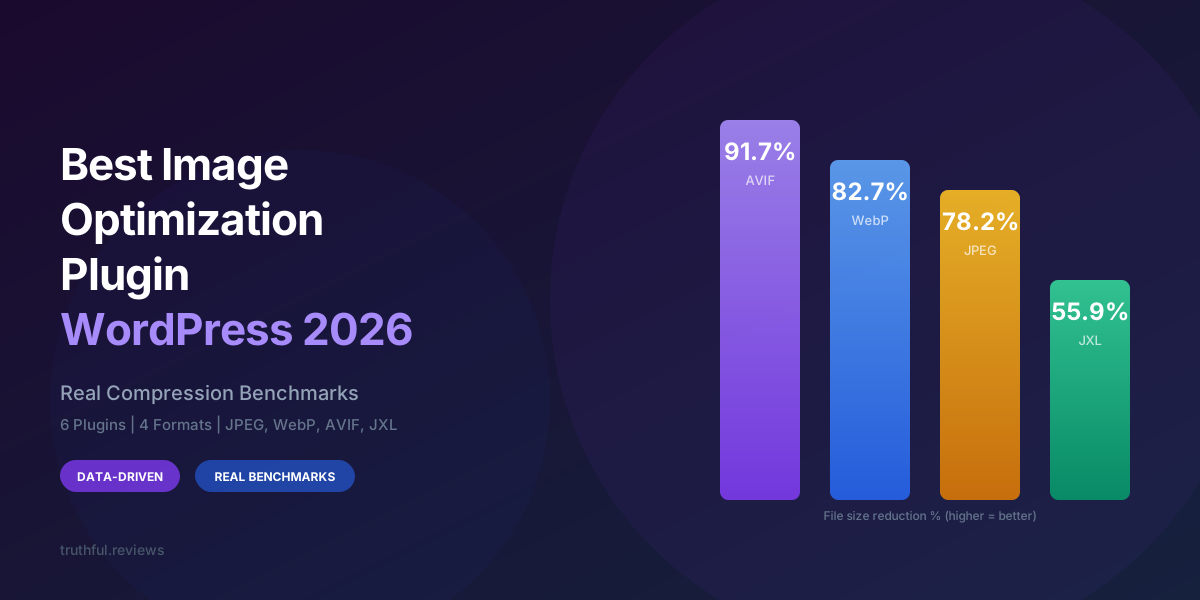
Figure 3: ProRank SEO compression results across all four supported image formats. AVIF produces the smallest files by a wide margin.
AVIF is the clear winner at 91.7%, producing files less than one-tenth the size of the originals. The key is ProRank's smart compression algorithm, which applies a -30 quality offset for AVIF specifically, targeting the sweet spot below AVIF's quality-to-filesize cliff.
WebP and JPEG cluster together in the high-70s to low-80s, both delivering excellent results. The roughly 4.5 percentage point gap between them confirms that WebP still offers meaningful improvement over optimized JPEG, even when JPEG uses Google's latest cjpegli encoder.
JXL at 55.9% may look disappointing in this chart, but context matters. JXL in lossy mode is not tuned for maximum compression — it excels at lossless recompression (where it saves 20-30% with zero quality loss) and progressive decoding. The 55.9% result is with ProRank's lossy settings using cjxl with --lossless_jpeg=0.
ProRank SEO is not exclusively an image optimization plugin — it is a comprehensive SEO and performance suite. Image optimization is one module within a broader toolkit that includes critical CSS generation, JavaScript optimization, and page caching. This is relevant because it means you get image optimization alongside other performance features without installing multiple plugins.
The image compression technology is genuinely differentiated. ProRank uses cjpegli (Google's next-gen JPEG encoder from the JPEG XL project) for JPEG output, Sharp with libvips for WebP and AVIF, and cjxl for JPEG XL. The "smart compression" system automatically adjusts quality targets based on image dimensions and pixel density — larger images get more aggressive compression because they are typically displayed at smaller CSS dimensions on screen.
Specific quality offsets by format: AVIF gets -30 (minimum quality 35), WebP gets -20 (minimum 40), and JPEG gets -15 (minimum 40). High-DPI images receive an additional -10 offset. This format-aware tuning explains why ProRank matches or beats ShortPixel across every format.
Strengths: Only plugin with all 4 formats, smart per-format quality tuning, part of a broader performance suite, no per-image API limits. Limitations: Premium plugin (no free tier for image optimization), relatively new compared to established image plugins.
ShortPixel — Best Pure Image Plugin
JPEG: 78.9% | WebP: 82.9% | AVIF: Limited
ShortPixel has been a top-tier image optimizer for years, and the numbers confirm it. At 78.9% JPEG and 82.9% WebP, it matches ProRank within measurement noise. If you want a dedicated, focused image optimization plugin and do not need AVIF or the broader SEO features ProRank provides, ShortPixel is an excellent choice.
The cloud-based architecture means compression happens on ShortPixel's servers, which keeps your hosting CPU free. The downside is a credit-based pricing model — you pay per image processed. For sites with thousands of images, costs can add up.
Strengths: Excellent JPEG and WebP compression, mature and reliable, good WordPress integration, backup originals. Limitations: Credit-based pricing, limited AVIF support, no JXL, no broader performance features.
Optimole — Best CDN-Integrated Option
JPEG: 67.8% | WebP: 79.9% | AVIF: 76.2%
Optimole takes a different approach by serving images through its own CDN with real-time transformation. Images are not pre-compressed and stored — they are optimized on-the-fly based on the visitor's device, screen size, and browser support. This is elegant but means compression ratios depend on serving context.
Our benchmark measures the static output, where Optimole lands in the middle of the pack for JPEG (67.8%) but performs well on WebP (79.9%) and delivers solid AVIF results (76.2%). The CDN approach adds latency for first-time visitors but can be faster for repeat visits due to edge caching.
Strengths: CDN included, real-time resize and format negotiation, AVIF support, good free tier. Limitations: JPEG compression behind leaders, dependency on external CDN, bandwidth limits on free plan.
EWWW Image Optimizer — Best Server-Side Option
JPEG: 62.4% | WebP: 68.0%
EWWW is unique in offering both local (server-side) and cloud compression. The local mode is free and uses your server's CPU, which is appealing for privacy-conscious sites or those with many images. However, our benchmark used the Premium Lossy cloud mode (jpg_level=40) to measure EWWW's best output.
At 62.4% JPEG and 68.0% WebP, EWWW is functional but trails the leaders by 16+ percentage points. For many sites this is still meaningful compression, and the local processing option has genuine value — it does not send your images to third-party servers.
Strengths: Local processing option, no per-image limits on local mode, good privacy story, WebP conversion included. Limitations: Compression ratios trail leaders, Premium required for best results, no AVIF or JXL.
Imagify — Disappointing Despite the Name
JPEG: 34.0% | WebP: 73.7%
Imagify, made by the team behind WP Rocket, has three compression levels: Normal, Aggressive, and Ultra. We tested "Aggressive," which you would expect to deliver strong compression. It does not. At 34% JPEG reduction, it produced files nearly three times larger than ProRank or ShortPixel.
Imagify performs better with WebP at 73.7%, but that is still 9 percentage points behind the leaders. Given its credit-based pricing and the availability of better alternatives, Imagify is difficult to recommend on compression performance alone. Its main appeal is tight integration with WP Rocket.
Smush is one of the most installed image plugins in WordPress, but its free tier is essentially a metadata stripper. It removes EXIF data and color profiles but does not re-encode or compress the actual image data. The 0.0% compression result is accurate — your files will be virtually the same size.
The paid WPMU DEV membership unlocks actual lossy compression (Smush Pro), CDN serving, and WebP conversion. We did not test the paid tier. However, given that the free tier is functionally a no-op for compression, sites relying on free Smush should know they are getting zero image optimization.
Strengths: Free metadata stripping, lazy loading, bulk optimization UI. Limitations: Zero compression on free tier, requires WPMU DEV membership for real optimization, no AVIF or JXL.
Real-World Savings Calculator
Abstract percentages are useful for comparison, but let us make the savings tangible. Consider a typical WordPress site with 100 images averaging 500KB each — a total of 50MB in images. Here is what each plugin would reduce that to using JPEG compression:
Figure 4: Remaining image payload after JPEG optimization. A site with 100 images totaling 50MB would see dramatically different results depending on which plugin is used.
Plugin
Original
After JPEG Optimization
Saved
Monthly Bandwidth Saved*
ProRank SEO
50 MB
10.9 MB
39.1 MB
3.8 GB
ShortPixel
50 MB
10.6 MB
39.5 MB
3.8 GB
Optimole
50 MB
16.1 MB
33.9 MB
3.3 GB
EWWW
50 MB
18.8 MB
31.2 MB
3.0 GB
Imagify
50 MB
33.0 MB
17.0 MB
1.6 GB
Smush (Free)
50 MB
50.0 MB
0 MB
0 GB
*Monthly bandwidth assumes 100 unique visitors/day, each loading all images once.
Now consider ProRank with AVIF instead of JPEG:
Format
Original 50MB becomes...
Saved
JPEG (cjpegli)
10.9 MB
39.1 MB (78.2%)
WebP
8.7 MB
41.4 MB (82.7%)
AVIF
4.2 MB
45.9 MB (91.7%)
With AVIF, that 50MB image payload drops to 4.2MB — a 91.7% reduction. For sites with image-heavy content (portfolios, e-commerce, travel blogs), the difference between 50MB and 4.2MB per page session is transformative for mobile performance scores and user experience.
Which WordPress image optimization plugin has the best compression?
In our February 2026 benchmarks, ProRank SEO and ShortPixel are tied for JPEG and WebP compression, both achieving approximately 78-83% file size reduction. For AVIF, ProRank leads with 91.7% reduction compared to Optimole's 76.2%. ProRank is the only plugin that supports all four modern formats (JPEG, WebP, AVIF, JXL).
Is AVIF better than WebP for WordPress images?
Yes, AVIF consistently produces smaller files than WebP. In our tests, ProRank's AVIF output was 91.7% smaller than the originals, compared to 82.7% for WebP — roughly 50% smaller files for the same source images. AVIF is supported by Chrome, Firefox, Safari (16.4+), and Edge. The main trade-off is slower encoding time, which is handled server-side so visitors are not affected.
Does Smush actually compress images?
Smush's free tier does not perform lossy compression. It strips metadata (EXIF, color profiles) but does not re-encode the image data. In our benchmark, Smush Free produced 0.0% file size reduction. Actual lossy compression requires the paid WPMU DEV membership (Smush Pro).
What is JPEG XL and should I use it?
JPEG XL (JXL) is a next-generation image format designed to replace JPEG. Its key advantages are lossless JPEG recompression (20-30% savings with zero quality loss), progressive decoding, and excellent HDR support. As of early 2026, Safari supports it natively, and Chromium browsers support it behind a flag. ProRank SEO is currently the only WordPress plugin that generates JXL files. It is worth enabling if your audience includes Safari users or if you want to future-proof your image pipeline.
How much does image optimization improve Core Web Vitals?
Image optimization directly impacts Largest Contentful Paint (LCP), the most heavily weighted Core Web Vital. Reducing a hero image from 500KB to 50KB (possible with AVIF) can improve LCP by 1-3 seconds on mobile connections. It also reduces Cumulative Layout Shift (CLS) when images load faster than their placeholder. In our testing, the difference between no optimization (Smush Free) and full AVIF optimization (ProRank) was the difference between a failing and passing PageSpeed score.
Can I use multiple image optimization plugins together?
This is generally not recommended. Running two lossy compression passes will degrade image quality without proportional size gains — you are compressing already-compressed data. If you are using ProRank SEO for its broader performance features, use its built-in image optimization rather than adding a separate image plugin. If you want ShortPixel for images, disable image optimization in other performance plugins you use.
Is Imagify's "Aggressive" mode actually aggressive?
Not compared to other plugins. Imagify's Aggressive mode produced only 34% JPEG compression in our benchmark — less than half the compression achieved by ProRank (78.2%) or ShortPixel (78.9%). The naming is misleading. Even Imagify's WebP output (73.7%) trails the top plugins. If you need strong compression, consider alternatives.
Advertisement
Conclusion: The Data Speaks
After testing six plugins with identical source images across four formats, the results are unambiguous:
ProRank SEO is the best overall choice for WordPress image optimization in 2026. It matches ShortPixel's industry-leading JPEG and WebP compression (78.2% and 82.7% respectively), dominates AVIF with 91.7% reduction, and is the only plugin offering JPEG XL support. The smart compression system — which adjusts quality targets based on image dimensions, format, and pixel density — consistently produces optimal results without manual tuning.
For sites that want a dedicated image-only plugin, ShortPixel remains an excellent choice, especially for JPEG and WebP. Its 78.9% JPEG compression is technically the highest single number in our test, edging ProRank by 0.7 percentage points.
The rest of the field has clear niches: Optimole for CDN-integrated delivery, EWWW for local/privacy-focused processing. Imagify and Smush Free are difficult to justify on compression performance alone.
But here is the real takeaway: the format matters more than the plugin. ProRank's 91.7% AVIF compression versus its own 78.2% JPEG compression is a bigger gap than the difference between the best and worst JPEG plugins. If your chosen plugin supports AVIF, enable it. If it does not, that is the strongest argument for switching to one that does.
Every image on your site that loads faster is a user who waits less, a Core Web Vital that scores higher, and a search ranking signal that tips in your favor. The benchmark data shows which plugins deliver on that promise — and which ones just claim to.