A NAS — network-attached storage — is your own private cloud: a small, always-on box of hard drives that lives on your home network, quietly backing up every device in the house, streaming your films to the TV, and holding the years of phone photos that would otherwise clog Google or Apple's servers. Once set up, it just works, and your data stays yours. An extensive test of beginner-friendly NAS drives sorted the best, and these are the top picks, checked against current UK prices.
What to Look For
Bays and capacity. A "bay" is a slot for a hard drive. Two-bay units are the sweet spot for a first NAS: run two drives as a mirror and your data survives one drive failing. Remember that a mirror halves your usable space, so two 4 TB drives give you 4 TB of protected storage, not 8 TB. Four-bay models hold far more and allow more flexible protection. Remember that almost all of these are sold diskless — you buy the NAS-rated drives (such as WD Red or Seagate IronWolf) separately, and fitting 2.5-inch drives usually needs an adapter.
Software and ecosystem. This is what separates a great NAS from a cheap box. Synology's DSM software is the benchmark, with polished apps for backups, photo management and remote folder syncing, plus the Btrfs file system and folder snapshots for extra protection against accidental deletion or ransomware. A friendly app ecosystem matters more to a beginner than raw specifications.
Network speed. The port speed sets how fast files move. Standard gigabit is fine for backups and streaming, but a 2.5 GbE port shifts large files noticeably quicker, and high-end units offer 5 Gbit or even 10 Gbit networking for professionals. If you regularly move big video files, pay for the faster port.
Memory and processor. More RAM means smoother multitasking, more users and better media handling. Entry units ship with around 2 GB, mainstream models offer 4 GB to 8 GB, and the most powerful expand to 64 GB. A stronger processor also helps if you want to transcode video or run containers and virtual machines.
Power and noise. Because a NAS runs 24/7, efficiency counts. The best sip as little as 3.1 watts at rest and only draw around 18 to 20 watts under load, and a light, compact chassis — the winner weighs just 0.6 kg — is easy to tuck away. Bear in mind that the hard drives inside generate heat and can climb above 75°C in a cramped, poorly ventilated cabinet, so give the unit some breathing room and look for quiet fans if it will sit in a living room.
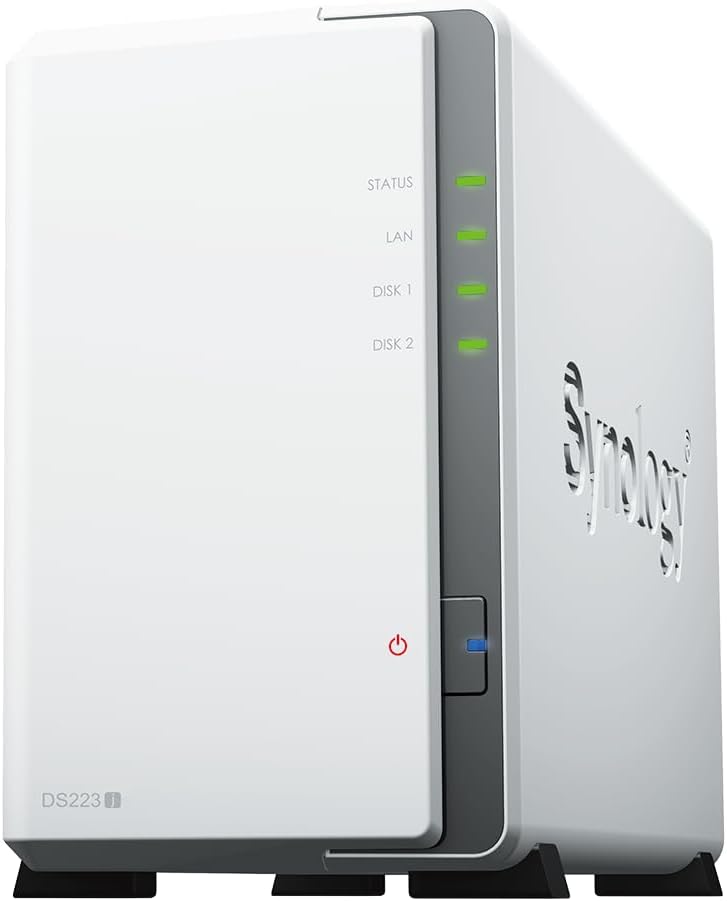
The Winner: Synology DS223j
The Synology DS223j (around £179.97) is the best NAS for most first-time buyers. It is a two-bay unit built around Synology's superb DSM software, which makes tools and apps for file access, intelligent photo management, fully automatic backups and remote folder syncing genuinely easy to use. The Btrfs file system with folder snapshots adds a real safety net, and it runs cool, quiet and economical. Setup does require a Synology account and the Windows helper tool is a touch fiddly, but nothing here matches its blend of simplicity, security and ecosystem. Check the price on Amazon