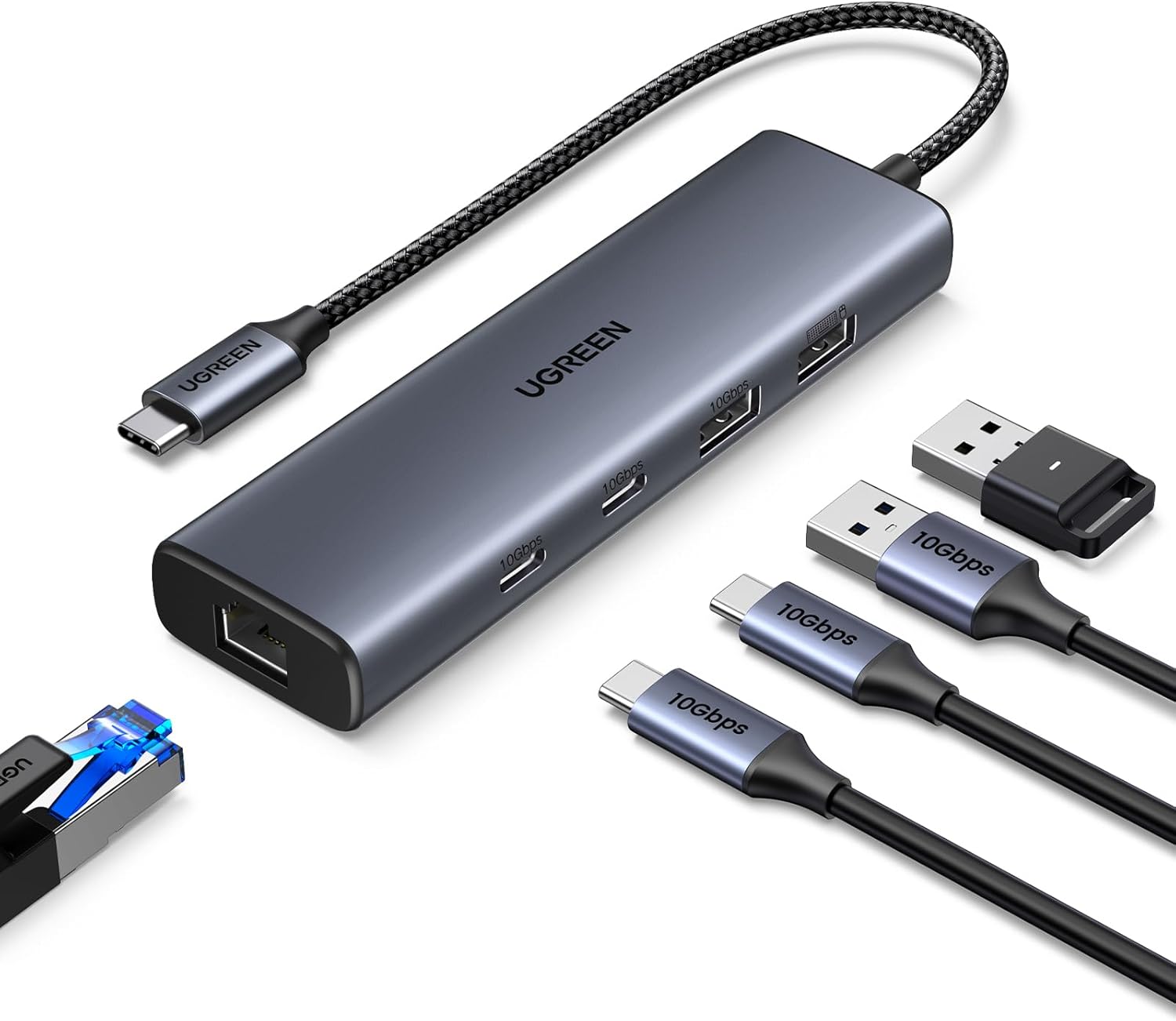
A USB-C hub is the compact answer to a laptop or tablet with too few sockets. One short cable can add USB-A, USB-C, a card reader or a wired-network connection without turning a slim computer into a permanent desk installation. The difficult part is choosing the right mix: a row of fast data ports is more useful than an impressive socket count if half the extras will go unused.
This guide carries all three recommendations and all twelve detailed also-tested models from a recorded field of 27 USB-C hubs. What follows is recorded testing, translated. Nobody at Truthful Reviews has used any of these hubs.
What matters when choosing a USB-C hub
Start with the equipment that actually needs connecting. A hub primarily increases the number of USB sockets, whether USB-A for older accessories or USB-C for newer storage and peripherals. Some add SD and microSD readers, Ethernet or a display output. A docking station goes further: in the source's definition it can power connected equipment adequately and drive one or more monitors, reducing a desk setup to one laptop cable.
The shape of the connector does not establish what it can do. Video and charging features depend on the host laptop or tablet supporting DisplayPort Alt Mode and Power Delivery, while transfer speed is limited by the slowest part of the chain: hub, integrated cable, host port or connected device. Several devices using a hub at once also share the total bandwidth.
For ordinary flash drives and peripherals, 5 Gbps is often enough. Moving large files such as 4K video is where 10 Gbps ports save noticeable time, provided the computer matches that rate. Cable length matters just as much in daily use. An extremely short lead can leave the hub hanging from a laptop stand, while an exceptionally long one occupies more of the desk and is harder to keep tidy.
How the hubs were assessed
The hubs were used for several consecutive days from the USB4 port of a Windows PC. Connected equipment included an external SSD rated at 20 Gbps, ordinary flash drives, a mouse, keyboard, headset and headphones, using both cables and wireless dongles. Transfer rates from USB sockets and any card readers were checked with CrystalDiskMark, while HDMI outputs were connected to a 4K television running at 60 Hz. Reliability and brief connection losses were observed alongside speed.
Construction, dimensions, weight and cable handling also counted. Particular attention went to whether the lead let a hub rest flat when the computer was raised on a stand. Exact temperatures were not recorded, so no temperature or safety conclusion is carried here.
The recommendations
Best for most people — Ugreen CM512
The Ugreen CM512 is the most balanced hub in the field. It adds two USB-C sockets and two USB-A sockets rather than filling the case with rarely needed extras. Both USB-C ports and one USB-A port transfer at up to 10 Gbps; the remaining USB-A socket uses USB 2.0, which is enough for a mouse, keyboard or headset. Gigabit Ethernet sits on the short edge for computers without their own wired-network socket.
A rear USB-C input accepts an optional 5 V supply. This powers the hub itself rather than charging the connected computer, and is intended to keep the data rate stable when several ports are working together. The hub still functions without that extra supply.
The grey aluminium body with black plastic end panels is compact at 12.4 × 3.6 × 1.6 cm and weighs 71 g. Its braided 31.5 cm cable is flexible, long enough to reach down from a laptop stand and not so long that it dominates a desk. The build is good, though anyone needing a display output, card reader or a wider assortment of sockets will need a different class of device.
Search Amazon UK · Search Amazon US
Best for USB-C devices — Ugreen CM480
The Ugreen CM480 deliberately gives up variety for four USB-C ports, each rated at up to 10 Gbps. That focused arrangement suits a setup already centred on USB-C storage, flash drives, webcams and wireless dongles. There is no USB-A fallback and no status light.
Its 10.1 × 3.9 × 1.3 cm case is narrow and easy to store but broad enough not to twist about excessively on the table. Weight is 72 g. Most of the body is well-finished silver aluminium, with a black plastic cover at the cable end and a mirrored silver-plastic panel at the other; that glossy panel marks more readily than the metal. The braided 21.5 cm lead is notably flexible and lets the hub lie flat beneath a raised laptop.
Search Amazon UK · Search Amazon US
Best for four USB-A devices — Byeasy UH-109D
Strictly speaking, the Byeasy UH-109D starts as a USB-A hub. Its integrated cable ends in a USB-A plug, while a tethered USB-A-to-USB-C adapter lets the same unit connect to newer computers. The adapter's flexible plastic loop appeared sturdy provided it was not bent sharply. It is a useful arrangement when both older and newer machines need to share one set of peripherals.
All four USB-A sockets run at up to 5 Gbps, enough for many accessories and moderate transfers but not the fastest choice for large backups. Black plastic keeps the weight to 43 g, and the body measures only 9.4 × 2.8 × 1 cm. A visible but modest seam around the shell makes it look less polished than the aluminium alternatives, while the blue status light can appear bright from directly above.
The defining feature is the 60 cm cable. It can reach a desktop PC more easily than the short leads on most hubs, though it also leaves more cable to arrange beside a laptop. Choose this one for four USB-A ports and connector flexibility, not for USB-C expansion or 10 Gbps transfers.
Search Amazon UK · Search Amazon US
Also tested
Vonxite WK-01 — an aluminium hub with three 5 Gbps USB-A ports, one USB-C port limited to USB 2.0, Gigabit Ethernet and a USB-C-to-USB-A adapter; its 11 cm cable is the reason it can dangle awkwardly from a raised laptop. Search Amazon UK · Search Amazon US
Amazon Basics HUC1060 — three USB-A ports and one USB-C port run at up to 10 Gbps in a well-made aluminium-and-plastic body, but the integrated cable measures only 10.5 cm. Search Amazon UK · Search Amazon US
Anyplus HT-00603C — four USB-A sockets each reach up to 5 Gbps and the cable is adequately long, but the plastic shell looks particularly basic and its edges feel comparatively sharp. Search Amazon UK · Search Amazon US
Aceele AC01-00074 — two USB-A and two USB-C ports each offer 10 Gbps, but the very slim case twists on the desk and its lead is 18 cm shorter than the otherwise very similar long-cabled model in this field. Search Amazon UK · Search Amazon US
Newq NQ-HB-12 — two USB-A and two USB-C ports are all rated at 5 Gbps; the light black-plastic body scratches readily and the short cable can leave it suspended from a laptop stand. Search Amazon UK · Search Amazon US
Iczi USB-C 3.2 Hub 4-in-1 — two USB-A and two USB-C connections each run at 10 Gbps, with a dim blue status light and an exceptionally long 120 cm braided cable that will suit some desks and overwhelm others. Search Amazon UK · Search Amazon US
Ugreen CM806 — four USB-C ports each provide 10 Gbps and its braided lead is 10 cm longer than the CM480's, but the black plastic case feels less substantial and picks up scratches more readily. Search Amazon UK · Search Amazon US
Ugreen 2A2C — two USB-A and two USB-C ports all reach 10 Gbps, with a sensibly proportioned cable; the simple scratch-prone plastic case is what keeps it below the recommendations. Search Amazon UK · Search Amazon US
Oliveria 8-in-2 USB-C Hub — three USB-A 2.0 ports, two USB-C 2.0 ports, one 5 Gbps USB 3.0 port, slow SD and microSD readers and a USB-C-to-USB-A adapter make a broad but mostly slow combination. Search Amazon UK · Search Amazon US
Anker A8309 USB-Hub — a straightforward four-port USB-A hub running at 5 Gbps, held back beside the recommended USB-A model by its much shorter cable and lack of a connector adapter. Search Amazon UK · Search Amazon US
Mokin UC0101 — two USB-A ports support 5 Gbps, the third is limited to USB 2.0, and the 21 cm lead is adequate; its aluminium case with plastic side covers otherwise resembles many rivals. Search Amazon UK · Search Amazon US
Novoo 5-in-1 USB-C-Hub — two 5 Gbps USB-A ports, SD and microSD readers and an HDMI 1.4 output fit into a 45 g, 9.8 cm body with an 18 cm cable, making this a compact but deliberately limited option. Search Amazon UK · Search Amazon US
Verdict
The Ugreen CM512 is the sensible default because its two fast USB-C ports, one fast USB-A port, one peripheral-grade USB-A port and Gigabit Ethernet cover the most common gaps without unnecessary extras. Its 31.5 cm braided lead and low 71 g weight make the physical design as balanced as the port selection.
Choose the Ugreen CM480 when four fast USB-C sockets are the entire brief; its aluminium body, 10 Gbps ports and flexible 21.5 cm cable are the strongest focused package. The Byeasy UH-109D serves a different need, joining four 5 Gbps USB-A sockets to a 60 cm cable and a tethered USB-C adapter. Whichever layout fits, check the host port first: a hub cannot provide transfer, display or charging capabilities that the computer itself does not support.