Quick Specs
Our Verdict
The Creality SPARKX i7 Combo ranks 4th out of 10 tested 3D printers with the best price-to-performance ratio in the field. At €370 including a 4-spool filament changer, it delivers good print quality, simple operation, and low running costs — with some material and bridging limitations.
How We Prepared This Review
Prepared by our editorial team using verified source material, product research, and a British-English editorial rewrite before publication.
- We review the working bundle for product facts, comparisons, and buyer-relevant tradeoffs before publishing.
- Non-English source material is translated into British English and rewritten into our house style without carrying over publication branding.
- Affiliate links and price references are handled separately from editorial judgements and never determine the verdict.
Affiliate links never determine our verdicts. Commercial relationships are disclosed separately from the editorial assessment, and we aim to keep buyer guidance clear, specific, and evidence-based.
Pros & Cons
Pros
- Outstanding price-to-performance ratio — rated 1.0 (Very Cheap)
- Automatic filament changer (AMS) included for multi-colour printing
- Good print quality with fine 0.050mm minimum layer height
- Low energy consumption at 107W average
- Built-in camera with privacy cover for remote monitoring
- NFC-based automatic filament recognition
- Simple setup and intuitive Creality Print app
Cons
- Limited to 4 material types (PLA, PETG, PLA-CF, TPU)
- No direct USB or network cable connection to PC
- Bridging quality disappoints — noticeable stringing
- Occasional layer shifting on complex prints
- No enclosed build chamber
Full Specifications
Key Features
Outstanding price-to-performance ratio — rated 1.0 (Very Cheap)
Automatic filament changer (AMS) included for multi-colour printing
Good print quality with fine 0.050mm minimum layer height
Low energy consumption at 107W average
Built-in camera with privacy cover for remote monitoring
NFC-based automatic filament recognition
Creality SPARKX i7 Combo: A Lot of 3D Printer for Very Little Money
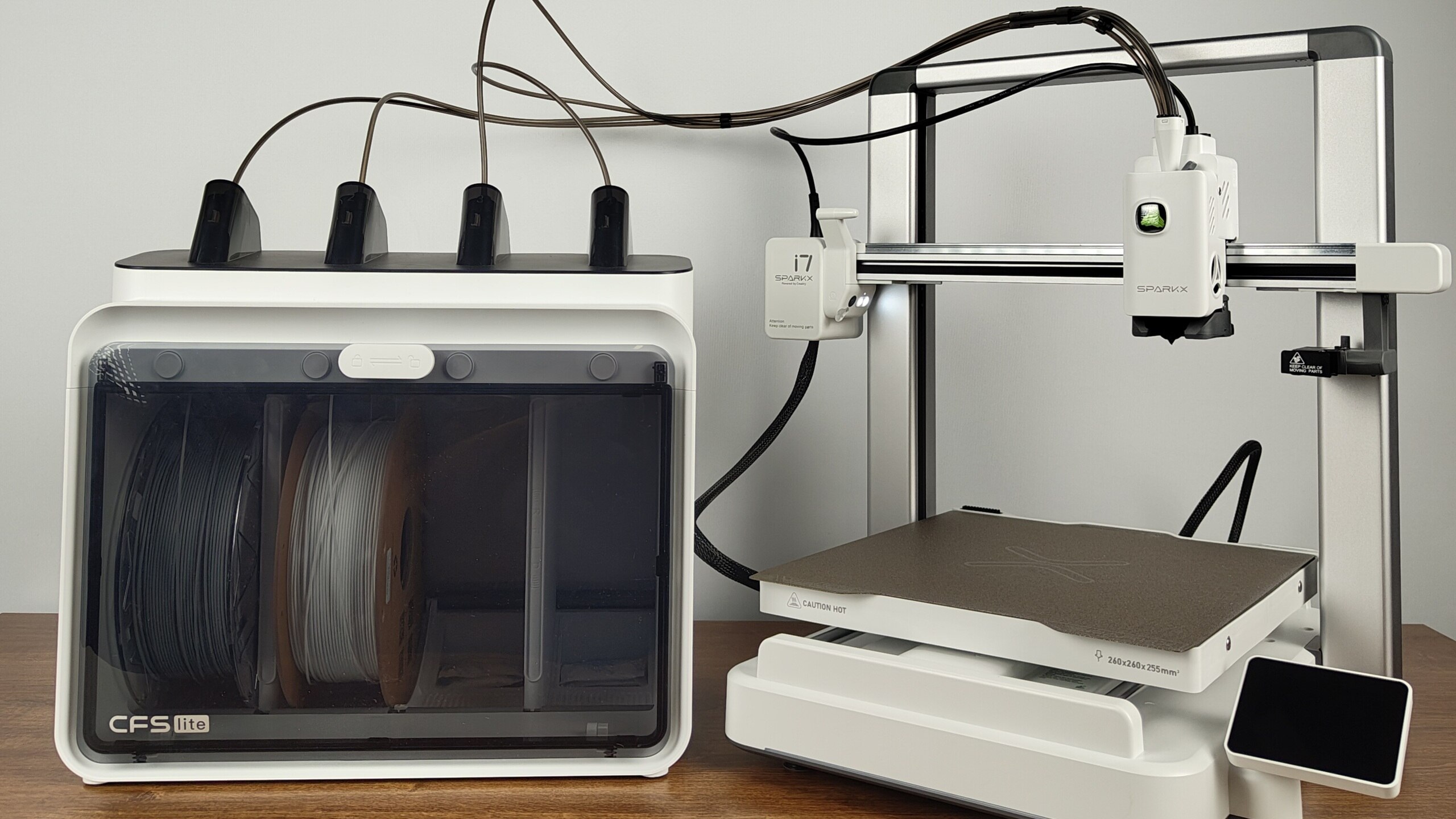
The Creality SPARKX i7 Combo earned its place as the fourth-best 3D printer in independent testing — and at approximately €370, it offers arguably the strongest price-to-performance ratio in the current FDM printer market. The Combo package includes an automatic filament changer (AMS), enabling multi-colour printing out of the box.
Test Verdict and Ranking
The Creality SPARKX i7 Combo received a test rating of 1.6 (Good), placing it 4th out of 10 tested 3D printers. Its price assessment scored a perfect 1.0 (Very Cheap), reflecting exceptional value for the feature set offered.
What You Get in the Combo Package
The "Combo" designation means the automatic filament changer (AMS) is included. This device sits alongside the printer and accommodates four spools of filament, enabling multi-colour prints with reduced filament waste. At this price point, having a bundled AMS is a significant advantage — most competitors charge substantially more for equivalent multi-colour capability.
Material Limitations
One notable restriction: the SPARKX i7 supports only four types of printing material — PLA, PETG, PLA-CF, and TPU. Creality states this limitation is deliberate, intended to guarantee consistent print quality. For most hobbyist and home users, these four materials cover the majority of common use cases. However, advanced users who work with exotic or engineering-grade filaments will find this constraint limiting.
No Enclosed Build Chamber
Unlike many current competitors, the SPARKX i7 does not feature a closed build chamber. Enclosed printers maintain more stable internal temperatures, which helps prevent warping and layer adhesion issues — particularly with materials like ABS and PETG. The Creality relies instead on its heated print bed alone for temperature management. In testing, this proved sufficient for good print quality with the supported materials, but it is a design choice that distinguishes the SPARKX i7 from more expensive alternatives like the Bambu Lab P1S.
Print Quality: Very Precise, With Some Weaknesses
Where It Excels
The Creality SPARKX i7 Combo impressed in several print quality tests. Hole and column test prints came out perfectly, and wedge prints were very smooth aside from minor first-layer edge imperfections. The minimum layer height of 0.050mm allows for fine detail work. Overall print quality is described as good — competitive with significantly more expensive printers.
Where It Struggles
The printer showed weaknesses in two specific areas. First, layer shifting was observed on cube and chess piece prints — likely caused by the print bed moving too quickly for the printer's vibration compensation. Second, bridging — printing filament spans without support structures — proved problematic. The difficult rhombicuboctahedron test shape emerged with noticeable stringing (unwanted filament threads). These are areas where more expensive printers with better motion systems and input shaping perform more cleanly.
The overall dimensional deviation of 0.36mm is slightly higher than top-tier models but not dramatic for a printer at this price.
Print Volume and Speed
The single extruder handles a build volume of up to 17.2 litres, with maximum dimensions of 260 x 260 x 255mm. The heated bed warms up quickly. A test cube with 20mm edges printed in 36 minutes — not the fastest, but acceptable.
Operation and Usability: Simple and Energy-Efficient

Setup and Assembly
Assembly is straightforward with a good instruction manual. The automatic filament changer sits separately from the printer. The display can be rotated to suit the printer's orientation — a thoughtful practical touch.
Control Options
The primary control method is via the Creality Print app over Wi-Fi. The software is proprietary (not open-source) but easy to use. Fine-tuning print settings through the app allows further quality improvements beyond default configurations. A built-in camera enables remote monitoring of print progress through the app, with a physical privacy cover available when the camera is not needed.
Printing without the app is possible via USB stick. However, there is no direct USB or network cable connection between the printer and a PC — a limitation that some users will find inconvenient.
LED status indicators on the lower frame show print progress at a glance. The spring steel print plate is magnetically attached for easy part removal. The printer also features automatic NFC-based filament recognition, even without the AMS connected.
Energy Efficiency
The SPARKX i7 is notably energy-efficient. Average power consumption during printing is 107 watts — considerably lower than many competitors. For a device that may run for many hours during larger prints, lower power draw translates to meaningful electricity savings over time.
Running Costs
Creality's own filament costs approximately €21 per kilogram — competitive pricing that keeps the total cost of ownership low.
Comparison With Top Competitors
The Creality SPARKX i7 Combo sits just below the top three 3D printers in the test rankings. The Prusa XL (5 Extruder) leads the field with excellent multi-head printing. The Bambu Lab H2D Combo offers a premium enclosed experience with superior motion systems. The Prusa SL1S SPEED leads the resin category. The Prusa MK4S delivers outstanding FDM print quality for single-material use.
What distinguishes the Creality is its price: at €370, it costs a fraction of these alternatives while delivering 80-90% of their print quality. For buyers on a budget who want multi-colour capability, no other current option offers comparable value.
Full Specifications

| Feature | Detail |
|---|---|
| Print Method | FDM |
| Build Volume | 17.2 litres (260 x 260 x 255mm) |
| Minimum Layer Height | 0.050mm |
| Dimensional Accuracy | 0.36mm total deviation |
| Supported Materials | PLA, PETG, PLA-CF, TPU |
| Extruders | 1 |
| AMS (Filament Changer) | Included (4 spools) |
| Heated Bed | Yes |
| Enclosed Chamber | No |
| Connectivity | Wi-Fi, USB stick |
| USB to PC | No |
| Camera | Yes (with privacy cover) |
| NFC Filament Detection | Yes |
| Power Consumption | 107W average |
| Filament Cost | ~€21/kg (Creality branded) |
| Weight | 9.6kg |
| Dimensions | 470 x 680 x 450mm |
| Price | ~€370 (Combo with AMS) |
| Test Rating | 1.6 (Good), 4th of 10 |
| Price Rating | 1.0 (Very Cheap) |
Conclusion
The Creality SPARKX i7 Combo is the value champion of the current 3D printer market. For €370 including a multi-colour filament changer, you get a printer that delivers good-to-very-good print quality, simple operation, low energy consumption, and practical monitoring features. The material limitations, lack of an enclosed chamber, and occasional bridging difficulties are real compromises — but at this price, they are easy to accept. For hobbyists, students, and anyone entering the world of 3D printing without wanting to spend four figures, the SPARKX i7 Combo is the obvious recommendation.
Ready to Purchase?
Check current prices and availability on Amazon
Affiliate Disclosure: Truthful Reviews is a participant in the Amazon Services LLC Associates Program and Amazon EU Associates Programme, affiliate advertising programs designed to provide a means for sites to earn advertising fees by advertising and linking to Amazon.com and Amazon.co.uk. This means if you click on an Amazon link and make a purchase, we may receive a small commission at no extra cost to you. This helps support our independent testing and honest reviews. Our editorial content is never influenced by advertisers or affiliate partnerships.