HomeArticlesBest 3D Printers 2026: 12 Models Lab-Tested
Buying Guide

Best 3D Printers 2026: 12 Models Lab-Tested

We compare 12 lab-tested 3D printers. The Bambu Lab H2D Combo wins with dual extruders and a drying filament changer; strong picks start at 339 euros.

2 July 2026
14 min read
Best 3D Printers 2026: 12 Models Lab-Tested

A snapped bracket on the dishwasher, a lost battery cover, a cable clip that no shop stocks any more — 3D printers have turned these small household defeats into twenty-minute jobs. The technology has long since left the professional workshop: current machines suit beginners and hobbyists as much as engineers, whether the goal is spare parts, practical everyday helpers or individual toys. This guide draws on a laboratory test field of 12 benchmarked 3D printers to show which models earn a recommendation — from a 339-euro price tip to a five-extruder flagship — and what actually matters when buying one.

The market has matured remarkably quickly. Capable entry-level machines now cost little, powerful high-end models and modern resin printers have fallen to surprisingly fair prices, and features that were exotic three years ago — automatic filament changers, enclosed build chambers, onboard cameras — have become standard equipment in the mid-range.

The Short Version

  • Best overall — Bambu Lab H2D Combo. Two extruders, a huge 33.8-litre build volume and a second-generation automatic filament changer with active drying earned the verdict "very good" (1.4). Equipment scored a perfect 1.0; the price of around 2,265 euros at the cheapest shop is the main hurdle.
  • Price tip — Creality SPARKX i7 Combo. A filament changer, simple controls and frugal 107-watt power draw for around 339 euros, graded "good" (1.6). Material choice is restricted and bridging is a weakness.
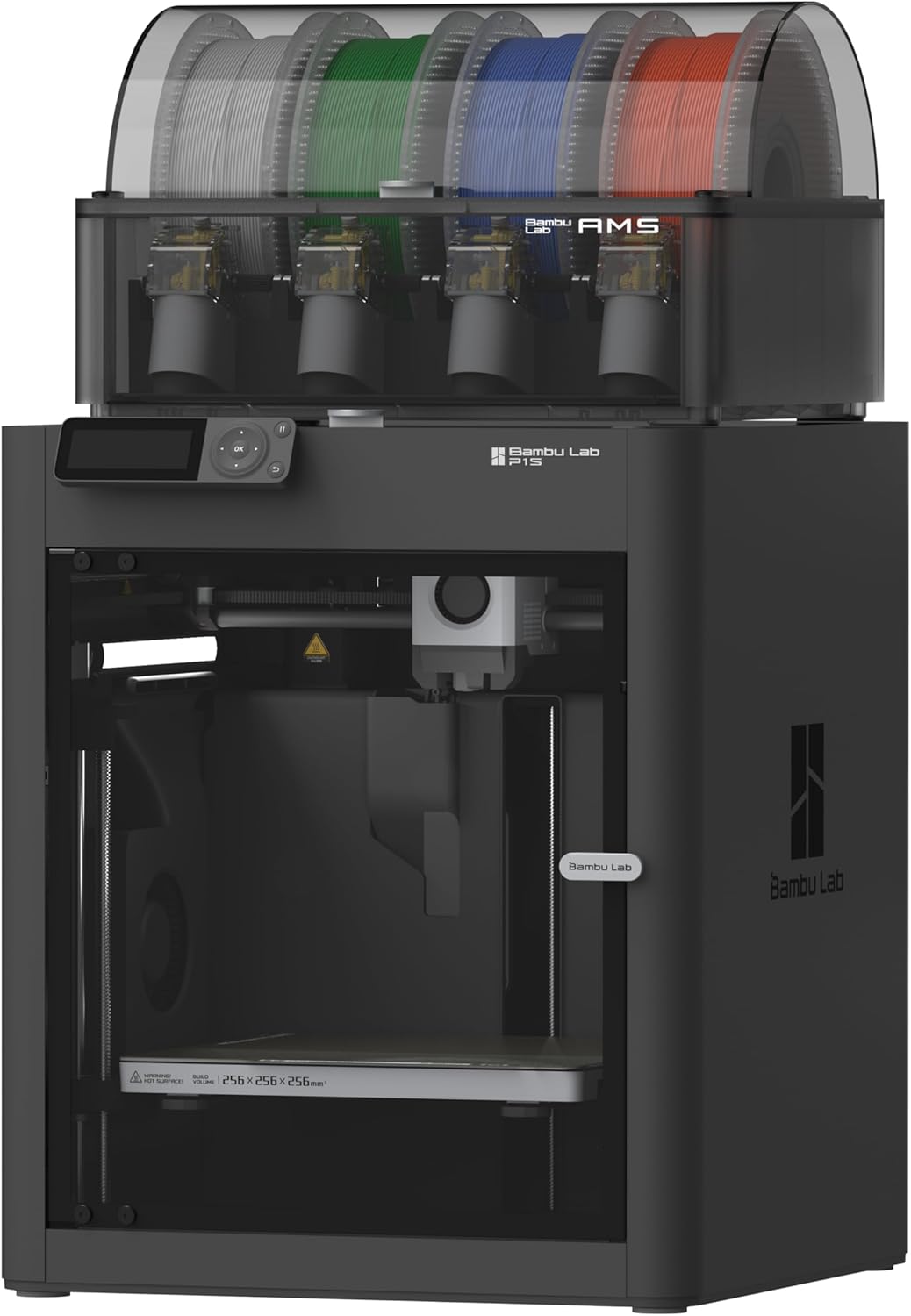
  • Top alternative — Bambu Lab P1S Combo. The best print quality of the four highlighted machines (1.2) in an enclosed housing with a four-spool filament changer, from around 619 euros — a "very good" (1.5) all-rounder with notably low running costs.
  • Price alternative — Anycubic Kobra S1 Combo. An enclosed printer whose filament box doubles as a dryer, with an AI-monitored camera, from about 359 euros. Print quality needs some fine-tuning to shine, hence "good" (1.8).
  • The absolute best in test — Prusa XL. The five-extruder flagship tops the whole leaderboard with a 1.3 verdict — at 4,599 euros, strictly for the committed.

The Winner: Bambu Lab H2D Combo

The H2D Combo is the machine for people who want 3D printing to feel finished rather than fiddly. It is a fused-deposition printer in a fully enclosed housing — which prevents larger objects warping as they cool — topped by an automatic filament changer (AMS) that holds four spools, dries them actively while they wait, and can even be cascaded with further changers. A fifth spool hangs on the side of the case. Combined with two extruders, which allow two-colour printing without any nozzle cleaning and save material on colour changes, the equipment list earned the test's perfect grade of 1.0.

The measurements back the comfort up. Total printing deviation came to just 0.06 millimetres — the most accurate result among the four highlighted machines — and the 33.8-litre build volume is roughly double what the other recommendations offer. The test prints of a cube, a chess piece and a rhombicuboctahedron were not entirely flawless, but still good, and other shapes succeeded superbly. An internal camera streams progress to the app, the display shows everything that matters, print-time forecasts proved very accurate, and the print bed calibrates itself.

The caveats are worth knowing. The Bambu Studio software is powerful and easy to use but not open source, and it insists on an internet connection: print jobs travel to the printer via the manufacturer's cloud, the maker retains remote access to the device, and local printing works only from a USB stick. The heated bed also warms across its full area regardless of object size, which pushes average power draw to a hefty 178 watts and the running-costs grade down to a middling 3.1. At 31 kilograms this is furniture, not a gadget. None of that stopped the overall verdict of "very good" (1.4) — it simply means the H2D Combo rewards people who will use its capabilities often enough to justify around 2,265 euros.

The Price Tip: Creality SPARKX i7 Combo

At around 339 euros, the SPARKX i7 Combo brings the automatic filament changer — the feature that most transforms everyday use — into genuine budget territory. The AMS unit sits in a closed box and enables multi-colour printing with less waste; the printer itself, however, has an open frame rather than an enclosed chamber. Filament recognition via NFC is built directly into the machine, tangles are detected reliably, and jobs arrive over Wi-Fi through the app or from a USB stick. A direct USB connection to a PC is not possible.

Print quality showed both strengths and weaknesses in testing. Accuracy is very high in some disciplines — holes, for instance, come out remarkably true — but bridging, printing freely across gaps without support structures, gave the machine real trouble, and smooth surfaces showed shift marks from the fast-moving print bed. The vibration compensation could be better; the total deviation measurement of 0.36 millimetres was the weakest of the four picks. Overall the quality still convinced at the price. The 17.2-litre build volume (26 × 26 × 25.5 centimetres) is generous for the class, the Creality Print software is closed-source but very simple to use with plenty of fine-tuning options, the bed is heated and self-calibrating, a camera watches progress — and at 107 watts this was the most frugal printer of the four. The verdict: "good" (1.6), with the test's best-value rating.

The Top Alternative: Bambu Lab P1S Combo

The P1S Combo is the machine to buy for print quality first. Its 1.2 grade was the best of the four highlighted models: fine details come out precisely, and the only complaint testers recorded was minimal vertical striping on upright surfaces. The total deviation of 0.12 millimetres confirms the impression. The enclosed build chamber prevents the bottom layers of larger objects cooling too quickly and curling upwards, and the four-spool filament changer feeds the extruder automatically — though it declined to cooperate with flexible material in the test.

The compromises mirror its bigger sibling: Wi-Fi printing runs only through the manufacturer's cloud, and local jobs arrive via micro-SD card. An integrated camera allows remote monitoring. The build volume of 16.8 litres is half the winner's, average power draw is a moderate 126 watts, and running costs earned a solid 1.8 — testers called the material costs outright low. With a "very good" (1.5) overall verdict from around 619 euros, the P1S Combo is arguably the most sensible purchase in the entire field for anyone who does not need the H2D's volume or dual extruders.

The Price Alternative: Anycubic Kobra S1 Combo

The Kobra S1 Combo undercuts even the price tip at its cheapest (around 359 euros) while offering something the SPARKX lacks: a fully enclosed housing, which keeps warping at bay on large-area objects. The filament box mounted on top holds four spools, feeds them automatically and doubles as a dryer for the material — a genuinely clever piece of packaging. An AI-assisted camera sends real-time or time-lapse footage to the phone, and print jobs can arrive by USB cable, USB stick or Wi-Fi, making it the most flexible of the four for data transfer.

The reason it sits fourth is print quality. With factory settings the results are good overall, but the layer structure remains clearly visible — the 0.22-millimetre deviation and 1.9 quality grade tell the story — and coaxing better results requires some fine-tuning. The machine is solidly and cleanly built, but mostly from plastic, and assembly is partly awkward. Equipment, by contrast, scored a strong 1.5. For a first printer with room to grow, the "good" (1.8) verdict at this price is an easy recommendation.

The Rest of the Leaderboard

Two further machines deserve mention. The Prusa XL is the best 3D printer in the entire test — verdict 1.3, with grades of 1.2 for ergonomics and running costs and 1.3 for print quality. Its party piece is up to five independent extruders, each an autonomous print head with slip-free planetary-gear filament feed, on a double-sided build plate that usually holds objects without any adhesive layer. The catch is the price: at 4,599 euros the value rating is a blunt "expensive" (4.5), which is why the far cheaper H2D Combo takes the recommendation for most buyers.

The Elegoo Centauri Carbon 2 Combo matches the SPARKX's "good" (1.6) verdict and earned the field's best value grade (1.0) at around 439 euros, with balanced marks across equipment (1.9), print quality (1.6), ergonomics (1.3) and running costs (1.4) — a fine alternative if the Creality is unavailable. And for anyone drawn to resin printing, testers point to the Anycubic Photon Mono X 6K at around 350 euros as the affordable route into the SLA world.

How Much Do You Need to Spend?

The market now stretches from Far-Eastern entry-level machines under 300 euros to industrial prototyping equipment beyond 6,000 euros, and the boundary between home and commercial hardware has become fluid at the top. For sensible home use, the typical corridor runs from about 500 to 2,000 euros, covering both filament and resin machines. Below 500 euros, the tested entry-level devices delivered consistently solid print results without major weaknesses — the savings show up instead in equipment and operating comfort: fewer automatic functions, simpler displays, more manual calibration.

Running costs deserve as much attention as the purchase price. Filament printers in particular can be run far cheaper by using recycled material instead of the manufacturers' original spools, while resin printers tie you more closely to specific consumables and cost noticeably more per printed object.

FDM or SLA: The Two Technologies

Home 3D printing is dominated by two methods. Fused deposition modelling (FDM) — also called fused filament fabrication (FFF), since the original name is trademarked — melts solid plastic filament and builds the object from layers that fuse and harden as they cool. Around two-thirds of all 3D printing worldwide uses this method: it is cheap, user-friendly and undemanding in maintenance.

Stereolithography (SLA) is the older, more precise technique: a laser (or, in the DLP and masked-SLA variants, a projector or LED array with an LCD mask) hardens liquid light-curing resin layer by layer. Fine structures and delicate details succeed noticeably better than with filament, but the workflow is more involved — prints need washing in alcohol and curing under UV light, support structures must be removed, and both the resins and the cleaning agents demand careful handling. Resin machines also print more slowly and cost more to run, which is why the test's recommendations for general home use are all filament printers.

What to Look For When Buying

Technique and intended use

Both technologies reach high print quality, but stereolithography handles fine structures and details better, while filament printers are cheaper, easier to clean and excellent with simpler shapes. The surcharge and extra effort of a resin machine must earn its keep through the objects you actually plan to print.

Print material

Filament printers work with thermoplastics that differ in melting point, adhesion and toughness. PLA and ABS in many colours are the standard and run in virtually every machine — without tying you to the printer maker's own brand. Whether more specialised materials such as nylon or carbon-reinforced filament are supported is stated by the manufacturer, and some machines (the SPARKX among them) deliberately restrict the choice. Resin printers use liquid photopolymers matched to the light wavelength of the machine, which in practice usually means the maker's own — and generally expensive — resin.

Build volume

Filament machines offer the most space: even compact models manage around 20 centimetres in every direction, large ones print objects 30 by 30 centimetres wide and deep, and volumes range from roughly 8 to well over 20 litres — the test winner manages 33.8. Resin printers are tighter: around 15 centimetres in width and depth, under 20 in height, and 2 to 4 litres of volume.

Speed and dual extruders

3D printing remains slow. A simple two-centimetre test cube took around 25 minutes on the quickest entry-level machines in the test and roughly twice that on average; resin printers needed up to an hour and a half plus washing and curing. Chasing speed is counterproductive anyway, since faster movement raises the error rate. A second extruder does not print faster either — but it allows two materials at once, enabling two-colour objects or water-soluble support structures, and remains rare enough that the winner's twin heads genuinely stand out.

Software and data transfer

Objects are designed in a 3D program, then translated for the printer by "slicer" software. Most manufacturers rely on free open-source slicers that the community keeps improving; some — including both Bambu Lab machines and the Creality — use proprietary programs. Both approaches work, but open source offers more control. On connectivity, check how jobs reach the machine: direct USB from the PC is common but not universal, Wi-Fi sometimes runs only through a manufacturer cloud, and memory cards or USB sticks handle local printing. Being able to start jobs at the device rather than only from the PC is a small everyday luxury.

Equipment

A heated print bed is close to essential on filament machines — without it, use is largely restricted to PLA — and automatic bed calibration spares you the fiddliest setup step; it is standard on dearer machines but still missing on some cheap ones. Print-time and material forecasts are near-universal now, and cameras for remote monitoring have trickled down to the budget class. If slicing large models becomes a hobby in itself, a capable computer helps too — our desktop processor guide covers the machines that chew through such workloads.

Size and weight

Box-built machines — all resin printers, and enclosed filament models like three of the four picks here — measure from around 40 centimetres per side, keep spools protected inside, and can weigh over 20 kilograms; the winner reaches 31. Open-frame printers have a smaller footprint of about 50 by 50 centimetres but stand up to 80 centimetres tall and weigh half as much. Either way, allow for ventilation around the machine.

Safety: What the Fumes and Resins Demand

Melting thermoplastics releases fine particles and volatile organic compounds. The measured quantities are not acutely harmful and remain below established limits — ABS emits more than PLA — but good ventilation is still sensible, ideally with the printer in a side room. A mask is unnecessary for filament printing.

Resin printing asks more care. The liquid resins should never touch skin — they are partly caustic and cause rashes — and finished prints are washed in alcohol or solvent, so gloves are mandatory and a mask is advisable, since the vapours resemble those of the plastics. The finished, cured objects themselves are harmless.

Cleaning and Maintenance

Precision suffers quickly when dirt accumulates. On filament machines, the heated bed largely prevents residue sticking, but the surface still wants regular cleaning — washing-up liquid works, cleaning alcohol is more thorough. Axes need to stay clean so the nozzle can travel freely, dust-free ventilation keeps efficiency up, and a clogged nozzle is cleared with the needle or wire that usually ships in the box. The manufacturer's instructions take precedence throughout.

Resin machines demand a routine: unused resin can be poured back after printing, but the vat needs cleaning each time, prints are bathed in alcohol and cured under UV, and every vessel involved needs washing — in latex gloves, ideally with a mask. It becomes habit, but it is genuinely more work than filament printing ever is.

Printers That Print Printers: The RepRap Idea

An open-source movement has pursued the self-replicating printer for years. The RepRap project (replicating rapid-prototyper) aims to make every component of a 3D printer printable on a 3D printer; plastic parts already are, while screws and electronics still have to be bought. Several commercial machines grew out of the project — most famously the Prusa i3, whose construction remains open and whose plastic parts any filament printer can copy. Its maker sells complete machines but also offers the non-printable components separately for self-builders — a route worth knowing about for tinkerers, alongside the ready-made test recommendations.

How the Printers Were Tested

Every machine passed through the same standardised laboratory procedure, with results held in a test database that recalculates the whole leaderboard whenever a new device sets a best value — the top performer in each category earns a 1.0 and everything else is regraded against it. Print quality dominates the verdict at 60 per cent: a set of standard objects challenges each machine with large flat areas, dimensional accuracy on the test cube, filigree details, smooth surfaces, gentle curves and sharp edges. Ergonomics covers accessibility, the quality of software and firmware, whether a PC is mandatory, and the helpfulness of displays. The equipment grade rewards connections, interfaces and expandability, and a final category prices up the true running costs — material plus energy, the total cost of ownership — on top of the purchase price.

Frequently Asked Questions

Which 3D printer is the best?

The best machine in the test is the Prusa XL, at a formidable price. The Bambu Lab H2D Combo delivers near-flagship capability for half the money, and the Anycubic Photon Mono X 6K covers the resin world for around 350 euros.

Which 3D printer suits beginners?

3D printing rarely succeeds perfectly at the first attempt, but many machines are simple enough for newcomers. Filament printers demand less effort than resin machines — and models with automatic calibration and filament changers, like the four picks here, remove most of the classic stumbling blocks.

Which materials can a 3D printer use?

Filament printers work with solid thermoplastics that are melted during printing — PLA and ABS are the standard, with variants such as HIPS or nylon possible depending on the machine. Resin printers use liquid photopolymers. Industry additionally prints metals and alloys.

Can a 3D printer print a 3D printer?

The RepRap project has made the plastic components of a printer fully printable; screws and electronics still need to be added. Kits based on the idea are commercially available.

The Bottom Line

Twelve lab-tested machines sort the market cleanly. The Bambu Lab H2D Combo wins with an equipment list nothing else matches — dual extruders, a drying filament changer, a 33.8-litre chamber — for buyers who can carry the price and the power bill. The Creality SPARKX i7 Combo brings the filament-changer comfort down to 339 euros with honest compromises, the Bambu Lab P1S Combo prints better than anything near its price, and the Anycubic Kobra S1 Combo packages an enclosed chamber and drying filament box for less still. Choose by what you will actually print: quality-first buyers take the P1S, volume and multi-colour work point to the H2D, and the budget picks cover everyone discovering — one printed dishwasher bracket at a time — why this hobby sticks.

Share Your Experience

Please sign in to leave a comment

Sign In

Loading comments...