A dedicated gaming display makes a real difference: adaptive sync stops the picture tearing, and refresh rates of 120 Hz and above change how a fast game feels. The trade-offs sit between panel types, resolutions and aspect ratios rather than in the badge on the bezel. These five come from a field of 40 monitors scored on picture quality, features and power draw, with UK prices checked on 2 August 2026.
The Short Version
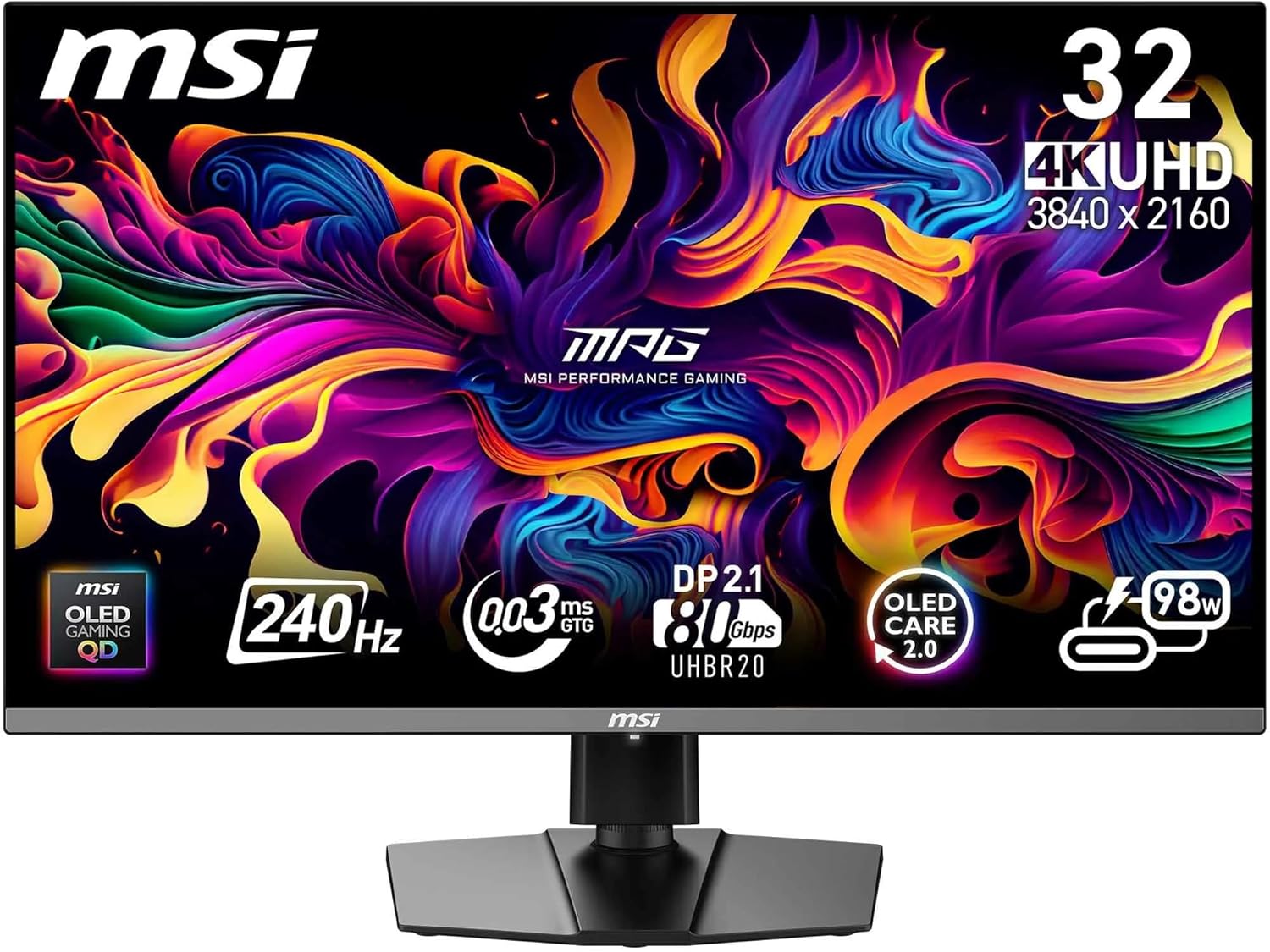
- Best overall — MSI MPG 322URX QD-OLED. 4K at 240 Hz with a measured peak of 1,033 cd/m² and DisplayPort 2.1a.
- Best value — Amzfast AMZG27F6U. A 27-inch matte 4K IPS panel with a dual mode reaching 320 Hz at Full HD.
- Best ultrawide — LG UltraGear OLED 45GX950A-B. 45 inches of curved 21:9 at 5,120 x 2,160.
- Top alternative — BenQ Mobiuz EX271UZ. 27-inch 4K QD-OLED with a perfect score for picture quality.
- Best budget big screen — ViewSonic VX3418C-2K. A 34-inch curved 21:9 VA panel at 180 Hz.
Best Overall: MSI MPG 322URX QD-OLED
Outstanding picture quality and a very strong feature set. The 32-inch panel delivers a bright, colour-rich image, while the QD-OLED technology combined with DisplayHDR True Black 400 produces excellent contrast and deep blacks. Peak brightness measured 1,033 cd/m², with full-screen white reaching a solid 239 cd/m². It covers the sRGB colour space completely and more than 98 per cent of the DCI-P3 space that matters for HDR — ideal for demanding content.
For gaming it puts up to 240 Hz on screen, where the lossless DisplayPort 2.1a plays to its strengths; over HDMI 2.1 you still get 4K at 120 Hz, along with current console features such as variable refresh rate and auto low latency mode. Desk tidiness is handled by an extensive USB hub with an integrated KVM switch, and picture signal plus power for a laptop can run over USB-C with up to 98 watts of charging. Only an Ethernet port is missing to round the package off. MSI leaves out built-in speakers and extras such as a microphone, webcam or brightness and presence sensors. Power consumption of 40 to 60 watts is practical enough. Amazon UK sells this as the MPG 322URX rather than the German-market 322URXDE, and the listing showed no current price on 2 August 2026, so the links below run a live search. Search on Amazon UK or search on Amazon US
Best Value: Amzfast AMZG27F6U
Strong picture quality at an attractive price. The 27-inch matte 4K IPS panel delivers decent brightness, good colour-space coverage and sharp images. Thanks to a dual mode you get either up to 160 Hz at UHD or 320 Hz at Full HD, which makes it suitable both for detail-rich games and for fast shooters. Add low power consumption and an ergonomically adjustable stand.
The compromises are the weaker black level typical of IPS, and the feature set: there is no USB-C, no USB hub and no KVM switch. Power draw of around 26 watts in use is fine. Overall it offers convincing value and recommends itself above all to cost-conscious gamers who want a versatile UHD monitor with a high refresh rate. This exact model is not listed on Amazon UK — other Amzfast monitors are, but they are different panels — so no price is quoted. Search on Amazon UK or search on Amazon US
Best Ultrawide: LG UltraGear OLED 45GX950A-B
A high-resolution OLED monitor for games. Across 45 inches of curved 21:9 it spreads up to 5,120 x 2,160 pixels. Images run at 165 Hz, but there is more available: an alternative mode at 2K resolution manages 330 Hz. The screen is very bright under optimal conditions, measuring over 1,150 cd/m². Full-screen it cannot match other panel types, as is typical of OLED, but it is among the brighter OLEDs. Contrast is high and colour-space coverage is excellent, though it shows slight weakness in the Adobe RGB space that matters to creators. HDR is supported up to DisplayHDR True Black 400.
It supports FreeSync, G-Sync and Adaptive Sync anti-tearing. The feature set includes two HDMI 2.1 ports, one DisplayPort 2.1, a USB-C hub carrying picture signal and charging current, and speakers. Fully loaded it draws a fairly hefty 58.6 watts. It was £1,579.00 on Amazon UK on 2 August 2026; the 45GX900A-B and 45GX90SA-B are different, cheaper panels and are not the same monitor. Check the price on Amazon UK or search on Amazon US
Top Alternative: BenQ Mobiuz EX271UZ
This 27-inch gaming monitor uses a QD-OLED panel at 4K resolution and shows colours very richly when required: 100 per cent of standard RGB and 99 per cent of the DCI-P3 space relevant to HDR. With a peak brightness of 929 cd/m² and DisplayHDR True Black 400, content looks colour-intense and high in contrast, while brightness on full-screen white drops to 238 cd/m². 240 hertz and a 0 millisecond response time deliver judder-free images, with sync technologies supporting that.
Efficiency is good: 31.8 watts in operation, 0.3 watts in standby. The strong feature set appeals — two HDMI 2.1 sockets, DisplayPort 1.4 and a USB hub, plus a USB upstream port and further USB-C and USB-A connections, an integrated KVM switch and a supplied remote control. Speakers, webcam, microphone and a network port are missing. The monitor is height-adjustable and swivels, though there is no pivot function. Additional gaming assistance functions complete the package. It was £769.00 on Amazon UK on 2 August 2026; the EX271U and EX271Q in the same results are different, lower-specified monitors. Check the price on Amazon UK or search on Amazon US
Best Budget Big Screen: ViewSonic VX3418C-2K
This 34-inch curved 21:9 monitor is an inexpensive option for gaming on a large area. With a resolution of 3,440 x 1,440 pixels and 110 ppi it offers sharp images and very fluid motion thanks to a 180 Hz refresh rate and 1 ms response time — ideal for fast games at high frame rates. HDR10 is supported, and measured brightness is 267 cd/m² on full white and 297 cd/m² at a point. That is enough for normally lit rooms; in direct sunlight the monitor reaches its limits. The VA panel scores with high contrast and rich blacks.
Colour reproduction suits gaming and multimedia well: 98.4 per cent sRGB, 84.2 per cent DCI-P3 and 81.7 per cent Adobe RGB. That is not enough for professional print work but entirely fine day to day. FreeSync Premium and Adaptive Sync deliver tear-free play. The feature set includes two HDMI 2.0 and two DisplayPort 1.4 connections for multiple devices. USB ports, KVM switch, Ethernet, webcam and RGB lighting are absent, but speakers and a headphone connection are built in. It is height-adjustable and swivels, though not usable in pivot, and is operated with a five-way controller. At only 33.6 watts in operation and 0.3 watts in standby, power consumption is very low. It was £206.92 on Amazon UK on 2 August 2026. Check the price on Amazon UK or search on Amazon US
What Actually Matters in a Gaming Monitor
Adaptive sync is the headline feature. G-Sync for Nvidia cards and FreeSync for AMD cards both synchronise the display's refresh rate with the graphics card's output, eliminating the tearing you otherwise see as unwanted rips across the picture. Manufacturers sometimes charge heavily for a built-in Nvidia module — a G-Sync monitor often costs meaningfully more than the otherwise identical model without it — though there are now G-Sync-compatible monitors that work without the extra module and cost less.
Panel type is the other decision. TN and VA generally switch a few milliseconds faster but lose contrast noticeably as soon as you are not looking straight at the screen. Unless you earn a living competing in fast action games, you are unlikely to perceive the difference in response times. IPS is more stable across viewing angles. OLED panels combine fast response times and high viewing-angle stability with superb contrast — but they are not always as bright as other panel types, partly because very bright scenes stress the picture elements and can lead more quickly to the dreaded burn-in. Expect a serious price premium for OLED, too.
Choosing a Resolution
More pixels mean more detail, but higher resolutions always cost more than lower ones, and three things decide what is right.
Screen size. Full HD, usually 1,920 x 1,080, suits small 24-inch monitors best. A 27-inch is still acceptable, but beyond that it becomes uncomfortable on a desk. From 27 inches a WQHD or 1440p monitor, usually 2,560 x 1,440, is appropriate; from 32 inches you can move to 4K or UHD, usually 3,840 x 2,160.
Viewing distance. Desks are typically 80 to 100 cm deep. The bigger the screen, the further away you should sit — especially at too low a resolution, since detail flaws show less at a distance. That is why monitors beyond 32 inches tend to grow in width rather than height. And for the sake of your neck, do not put a 55-inch panel directly in front of your face.
Your graphics card. If your PC has a Full HD-class card, WQHD and 4K screens are wasted on it. Equally, you might have a high-end card and still want WQHD rather than 4K, because high refresh rates matter more to you than the next step up in pixel density.
16:9, 16:10 or Ultrawide?
Most applications are built for 16:9 and 16:10. On a 16:10 monitor, films can leave slight black bars and a feeling that the pixels you paid for are not all being used, but for work and browsing the format is ideal.
Widescreen and ultrawide monitors usually come in 21:9 or 32:9. Games in these dimensions feel airy: interface elements get far more room, or are banished from the centre to the corners where they stay clear of the action. Sometimes an ultrawide even gives a small unfair advantage, because you see elements at the edge that would still be cropped on a 16:9 screen. Ultrawides usually keep to classic heights of 1,080, 1,440 or 2,160 pixels. It is worth doing the arithmetic on what your card has to drive: 5,120 x 1,440 is around 7.4 million pixels — less than the 8.3 million of a 16:9 4K monitor, but far more than the roughly 3 million of a WQHD screen, so you should plan for a 4K-class graphics card.
On curved screens: a gentle curve is genuinely pleasant on very wide monitors, because it makes detail easier to catch in your peripheral vision and counteracts the contrast loss that comes with a shifted viewing angle. You only need a screen bent like a banana if you are building an immersive cockpit in a multi-monitor setup — and a VR headset is usually cheaper and more effective for that.
One last drawback of ultrawide displays: because 21:9 and wider content has only arrived in recent years, older games and some new ones from smaller studios do not cope with the dimensions. At best you get a 16:9 image with large black bars either side; at worst the game is stretched to full width and parts of it run off the top and bottom.
Frequently Asked Questions
Which gaming monitor is best overall? The MSI MPG 322URX QD-OLED. It combines outstanding picture quality with 4K at 240 Hz, a measured 1,033 cd/m² peak, DisplayPort 2.1a and a USB-C hub delivering up to 98 watts.
Do I need G-Sync or is FreeSync enough? Both do the same job of synchronising the display to the graphics card. G-Sync monitors with a dedicated Nvidia module cost meaningfully more; G-Sync-compatible screens without the module are cheaper and work well.
Is OLED worth it for gaming? For contrast and response times, yes. Against it: OLED panels are not always as bright as other types, very bright scenes stress the pixels and raise the burn-in risk, and you pay a serious premium.
What resolution should I buy? Match it to the panel size and your graphics card: Full HD up to about 24 inches, WQHD from 27 inches, 4K from 32 inches.
Is an ultrawide better than 16:9? For immersion, often yes, and you sometimes see things at the edges sooner. But older games may letterbox or stretch, and driving 5,120 x 1,440 needs roughly 4K-class graphics power.
How much power do these use? Between about 26 watts for the Amzfast and 58.6 watts for the 45-inch LG at full load. The ViewSonic and BenQ sit around 33.6 and 31.8 watts, with 0.3 watts in standby.
Every pound figure above was read from the retailer's own listing on 2 August 2026 and is recorded in this page's verification evidence. Two of these monitors had no current Amazon UK offer for the exact model, so they carry search links rather than prices — the similarly named siblings in those results are different panels.