Quick Specs
Our Verdict
A genuinely fascinating first-generation product that proves the rollable laptop screen concept is technologically possible. With last year’s Intel hardware, ultra-limited connectivity, and a plastic-coated screen with strong reflections, this is for early adopters and concept-lovers only. A second generation will likely make this look obsolete quickly.
Research sources
Sources recorded for this page are linked below. Reported third-party testing belongs to the original publisher; it is not testing performed by Truthful Reviews.
Our editorial process
Research method, author and affiliate-independence details
Our editorial process
Research method, author and affiliate-independence details
Prepared by our editorial team using verified source material, product research, and a British-English editorial rewrite before publication.
- We review the working bundle for product facts, comparisons, and buyer-relevant tradeoffs before publishing.
- Non-English source material is translated into British English and rewritten into our house style without carrying over publication branding.
- Affiliate links and price references are handled separately from editorial judgements and never determine the verdict.
Read our full methodology: how we review
Affiliate links never determine our verdicts. Commercial relationships are disclosed separately from the editorial assessment, and we aim to keep buyer guidance clear, specific, and evidence-based.
Pros & Cons
Pros
- Two 16:9 screens in one rollable OLED display
- Premium haptic feedback touchpad with full-surface response
- Quality metal chassis construction
- Excellent thermal management — only 45°C max
- Sublime keyboard with rigid keys and good travel
- 120 Hz refresh rate available
- Comprehensive 187% sRGB / 125% DCI-P3 colour coverage
- 32 GB LPDDR5 RAM and 1 TB PCIe Gen 4 storage
Cons
- Plastic screen coating with very strong reflections
- Ultra-limited connectivity — only 2 USB-C Thunderbolt 4 ports
- 8-second mechanical unroll cannot be interrupted
- Loud unrolling mechanism with audible cogs
- Plastic rails on chassis lower the build quality
- Last year’s Lunar Lake configuration (Intel Core Ultra 7 258V)
- 1.69 kg weight is heavy for 14 inches
- 1.91 cm thickness far from modern norms
- Disappointing 8-9 hour battery life
- 397 cd/m² SDR brightness too low for the price
- ThinkBook Workspace software is buggy and limited
- Concerns about long-term durability with no protection on the rollable mechanism
Full Specifications
Key Features
Two 16:9 screens in one rollable OLED display
Premium haptic feedback touchpad with full-surface response
Quality metal chassis construction
Excellent thermal management — only 45°C max
Sublime keyboard with rigid keys and good travel
120 Hz refresh rate available
Lenovo ThinkBook Plus G6 Rollable Test: The Rollable Screen Is Really Here!
Editorial Verdict on the Lenovo ThinkBook Plus Gen 6 Rollable
Innovating is a real challenge when talking about a market established for a very long time. Why? Because the slightest risk-taking forces a deviation from consumer expectations, which become more thorough as a type of product becomes well known.
With the ThinkBook Plus G6 Rollable, the Chinese manufacturer Lenovo finally puts on the market one of its innovative concepts: a laptop capable of unrolling its screen to form an ever wider display. At least, in height, since the portrait format is favoured here. Interesting on paper, but what about in practice?
Technical Specifications

The machine was loaned by Lenovo for this test.
Design
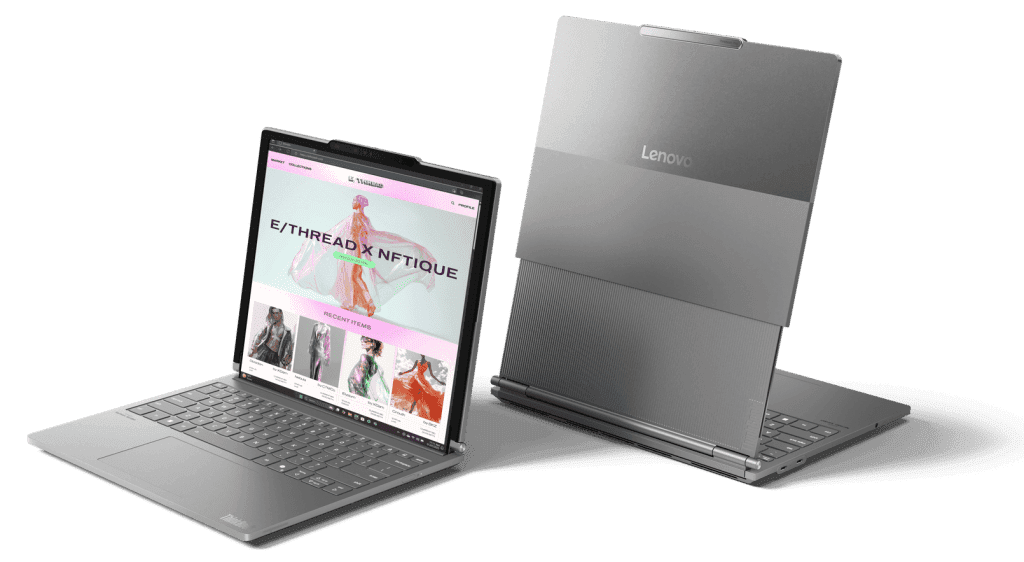
In photos, you could almost believe that the ThinkBook Plus G6 Rollable is a laptop like any other. A completely classic metal chassis, variations of grey everywhere... why not. Moreover, the upper shell is made of two coatings forming a discreet separation and a different rendering of light. An interesting stylistic choice for Lenovo.
Weight and Thickness
But here we go: we are far from being in front of an ordinary product. First, closed. We can see that it is much heavier than its 14-inch format would suggest, at 1.69 kilograms on the scale. Also, the screen hinge protrudes strangely on the outside, which has not been the case in portable computing for time immemorial. And finally, the thickness of 1.91 cm, far from today's canons.
The Rollable Screen Mechanism
It is open that we discover for the first time the star of the show: the foldable screen, which by default hides under the keyboard, but unrolls mechanically before our eyes by a simple press of a key on the keyboard. The unrolling is mechanical and takes a full 8 seconds. The opening cannot be interrupted, and is far from discreet: you can hear each cog activate throughout.
Build Quality Compromises
The presence of this screen, whose usefulness we will discuss in the software section, forces the metal frame of the chassis to integrate plastic rails far from being at the same level of quality across its entire contour. A small aesthetic blemish on this finely made product.
Durability Concerns
But as a user of foldable smartphones for several years, we are also afraid for the durability of this screen. When folded, in "normal" position, you can see a large space between the chassis and the screen that is protected by nothing, and which would risk causing irreversible damage if a little sand managed to slip in. Of course, a laptop does not have the same idea of adventure as a smartphone, but a little sand in a bag arrives so quickly...
A First-Generation Product
All in all, Lenovo succeeds in providing an innovative device with the ThinkBook Plus G6 Rollable, yes. But does so at the price of offering what we will call an "obvious first generation", reminiscent of the first Galaxy Z Fold and all its sacrifices. Suffice to say that if the product ticks enough boxes to meet today's expectations, it is obvious that a second generation will make a huge leap against it to the point that it is complex to justify buying this first version.
Keyboard and Touchpad

Lenovo again offers a superb keyboard configuration for its modern laptops. The keys are nicely rigid, offer good activation travel for this 14-inch format, and the rebound is sublime. Very comfortable.
The touchpad also gains in quality, with the integration of haptic feedback over the entire surface. It does not have the largest diagonal on the market, but is superbly comfortable with fantastic glide and very pleasant feedback.
Connectivity
One of the worst features of the ThinkBook Plus G6 Rollable. On the left, we find two Thunderbolt 4 USB-C ports at the top, and a combo jack strangely lodged at the very bottom of the segment. On the right, we only find the tablet-style power button.
While Thunderbolt 4 is naturally very versatile, the market has already spoken several years ago now: nobody wants to live the dongle life. It is simply not enough, even for a 14-inch format.
Webcam and Audio
The integrated 1440p webcam is far from offering beautiful performance. It struggles with wide dynamics and fails to provide clean treatment of colours and textures, for a noisy and dull image. The average of laptops in short.
The integrated speakers have nothing particularly remarkable. Neither good nor bad, very focused on the treble at the expense of the rest, with a stage that is not particularly wide. Serviceable.
Screen
The ThinkBook Plus G6 Rollable integrates a non-touch 14-inch OLED panel that can roll out to 16.7 inches vertically. This is a flexible panel, which means it is only protected by a layer of plastic whose reflections are much more marked than on most other devices, even compared to glossy glass coating.
Resolutions
The "closed" definition is 2,000 x 1,600, very close to square, while the device open reaches 2,000 x 2,350 pixels, that is two 16:9 screens stacked. The maximum refresh rate is 120 Hz, although set to 60 Hz by default.
Colour Coverage and Brightness
Under the test probe and with the CalMAN software from Portrait Displays, we find a coverage of 187% of the sRGB space for 125% of the DCI-P3 space. The maximum brightness is measured at 397 cd/m², for an average colour temperature of 6,055K a little too warm. The average delta e00 is measured at 3.6, excellent, for a maximum deviation of 6.3.
HDR Performance
In HDR, we find a maximum peak brightness of 646 cd/m², for an average delta e00 of 4.39 when we close our eyes to luminance errors. A calibration not so bad therefore, but the plastic coating coupled with the lack of brightness make the panel sometimes difficult to read even indoors near a window.
Software
Let us pass quickly over the common places. Lenovo as always has its Vantage software preinstalled, very nice for configuring in detail the behaviour of its laptop. And also has many advertising preinstalled software to uninstall quickly.
ThinkBook Workspace
For the ThinkBook Plus G6 Rollable, it was naturally necessary to make sure to optimise the use of this long vertical screen. You can naturally use it simply as a gigantic vertical screen, the largest tablet to watch or even produce Instagram, but that is not necessarily the main idea. We are really talking about two 16:9 screens stacked in terms of size, and therefore a form of portable multi-screen setup.
But here we go: Windows is not aware of it, and does not natively optimise for this type of product. Lenovo does what it can with the ThinkBook Workspace, software that allows integrating on the third of the bottom of the screen or the pure half several things. A widget system, which is not particularly convincing because very limited. "Smart Copy", a nice clipboard manager, but not innovative. Lenovo Virtual Display, a very buggy virtual screen that we will not recommend using. But above all, the possibility to put any application as a tab here.
Workspace Limitations
A system that works... but not as simply as we would like. Integrating your window where you want it, when you want it, often takes several back and forths between moving your windows and managing the Workspace tabs. We will therefore constantly prefer to go through the Windows pre-integrated utilities, which simply cut the area in two as we want it 99% of the time.
Performance
The ThinkBook Plus G6 Rollable is powered by the Intel Core Ultra 7 258V, the 2025 SoC integrating 8 cores — 4 performance, 4 efficient — for 8 threads that can turbo up to 4.8 GHz. It integrates 32 GB of LPDDR5 RAM at 8,533 MT/s, and offers 1 TB of storage in PCIe Gen 4.0.
Well, let us say it: it is a configuration from last year. As often on these concepts, they spend so much time in the research and development section that when the opportunity finally comes to bring them out, they are a little behind on configurations. The ThinkBook Plus G6 Rollable does not escape the rule.
Benchmarks
Under Cinebench 2024, we find scores of 532 points in multi core for 122 points in single core. This corresponds to 2,164 points in multi core for 462 points in single core under Cinebench 2026. If the scores are good for the previous generation, we see well here the performance bonus that Panther Lake offers us at Intel on the new generation.
This is all the more true on the integrated graphics side, with a score of 3,308 points on Steel Nomad Light. If Intel tends to make beautiful scores on this test that does not really come back in game for example, it must still be remembered how the Arc 140V part has evolved over updates to provide excellent performance measuring well against the Radeon 890M.
The storage corresponds well to the end of life of PCIe Gen 4.0, with superb scores for this technology.
Cooling and Noise
The ThinkBook Plus G6 Rollable maintains its performance very well even in the face of heavy synthetic demand. The heating of the device is far from marked moreover. We find 45°C maximum on the chassis which has nothing worrying.
Battery Life
The ThinkBook Plus G6 Rollable integrates a 66 Wh battery honourable for a 14-inch chassis. It is recharged via a 65-watt power supply, and the device is compatible with the Power Delivery standard.
In office use, brightness set to 50%, we find a battery life between 8 and 9 hours of use. The screen open or closed surprisingly does not really change the deal on this lifespan, the difference is rather an hour.
This is disappointing, but expected. Panther Lake could really offer the autonomy we expect these days, as the 2026 Zenbook Duo proves.
Price and Availability
Editorial Verdict
Positive Points
- Two 16:9 screens in one rollable display
- Haptic feedback touchpad
- Quality raw chassis construction
- Excellent thermal management
Negative Points
- Plastic screen coating with strong reflections
- Ultra-limited connectivity (only 2 USB-C Thunderbolt 4 ports)
- Still a bit "conceptual" in its construction
- Last year's hardware configuration (Lunar Lake instead of Panther Lake)
Ready to Purchase?
Check current prices and availability
Affiliate Disclosure: As an Amazon Associate I earn from qualifying purchases. Truthful Reviews may receive a commission when you buy through eligible Amazon UK or Amazon US links, at no extra cost to you. Affiliate partnerships never determine our verdicts or recommendations.