Most people buying a router are really answering one question: is the box my internet provider gave me actually holding me back?
Usually, yes. Provider routers tend to be basic, and they saturate quickly once a household has a lot of devices connected. Buying your own improves Wi-Fi range, real-world speed, security and stability — and the difference is most obvious if you game online, work from home, or run smart-home equipment.
You probably cannot remove the provider's box
This trips people up, so it is worth knowing before you order. In most cases you cannot simply unplug the provider's router, because the fibre modem — the ONT — is built into it.
What you do instead is connect your new router to the provider's unit by cable and then either switch the provider's box into bridge mode or turn off its Wi-Fi. From that point the provider's hardware just receives the incoming signal, and your new router manages all the traffic in the house. It is a settings change rather than an engineering job, but it is a step, and it is the reason a new router sits alongside the old one rather than replacing it.
Decode the model name first
This is the fastest way to judge a router before reading a single specification, because the letters in the name tell you which Wi-Fi generation it uses:
- AC — Wi-Fi 5. Now obsolete. Avoid buying it.
- AX — Wi-Fi 6 or Wi-Fi 6E. Not the newest, but excellent value.
- BE — Wi-Fi 7. The current standard, and the one to choose for a connection above 1 Gbps or a router you intend to keep for years.
If you take nothing else from this guide, take that. A great many routers still on sale are AC models, and the name tells you so at a glance.
What Wi-Fi 7 actually adds
The headline is raw throughput: maximum speed rises to 46 Gbps, against 9.6 Gbps for the previous generation. That matters if you have multi-gigabit fibre, because it is what lets you use that connection wirelessly rather than only over cable.
Three changes produce that. Channel width doubles: the 6 GHz band allows transmission lanes of up to 320 MHz, against a previous ceiling of 160 MHz. Per-stream throughput rises accordingly, from about 600 Mbps per stream at 80 MHz on the older standard to as much as 2,880 Mbps per stream at 320 MHz. And 4096-QAM modulation increases signal density enough to pack roughly 20% more information into the same slice of time.
The subtler change is MLO — multi-link operation. Where older systems force a device to pick one frequency and stay on it, Wi-Fi 7 lets devices use the 2.4 GHz, 5 GHz and 6 GHz bands simultaneously, which cuts latency and is about stability rather than peak speed. Wi-Fi 7 is aimed as much at keeping connections steady in device-saturated homes, and at energy efficiency and traffic management, as it is at the top-line number.
One caveat worth being clear about: Wi-Fi 7 is backwards compatible, so older devices connect to it without trouble — but to get the actual benefit, both ends need to support the standard. A Wi-Fi 7 router does not upgrade a Wi-Fi 5 laptop.
Antennas: the count matters, the shape does not
A persistent myth deserves retiring here. How many antennas a router has does matter — more antennas generally means more simultaneous data streams, via MU-MIMO.
Whether they are internal or external does not. Modern routers with internal antennas use beamforming to aim the signal directly at your devices, achieving the same or better results than the traditional external aerials people associate with a powerful router. A slab-shaped router with nothing sticking out of it is not a weak one.
Router or mesh?
The distinction is simple and decides which product you should be shopping for at all.
A standard router is a single device broadcasting from one point. In a large home, or one with thick walls, the signal arrives weakly in distant rooms — and no amount of specification fixes geometry.
A mesh system is two or more nodes distributed around the house that talk to each other and present a single Wi-Fi network. Your phone hands off automatically to the nearest node as you move, without dropping. That makes it the better answer for multi-storey homes and long corridors.
If that describes your home, buy a mesh system rather than a bigger router — our mesh Wi-Fi systems guide covers that side in full.
The picks
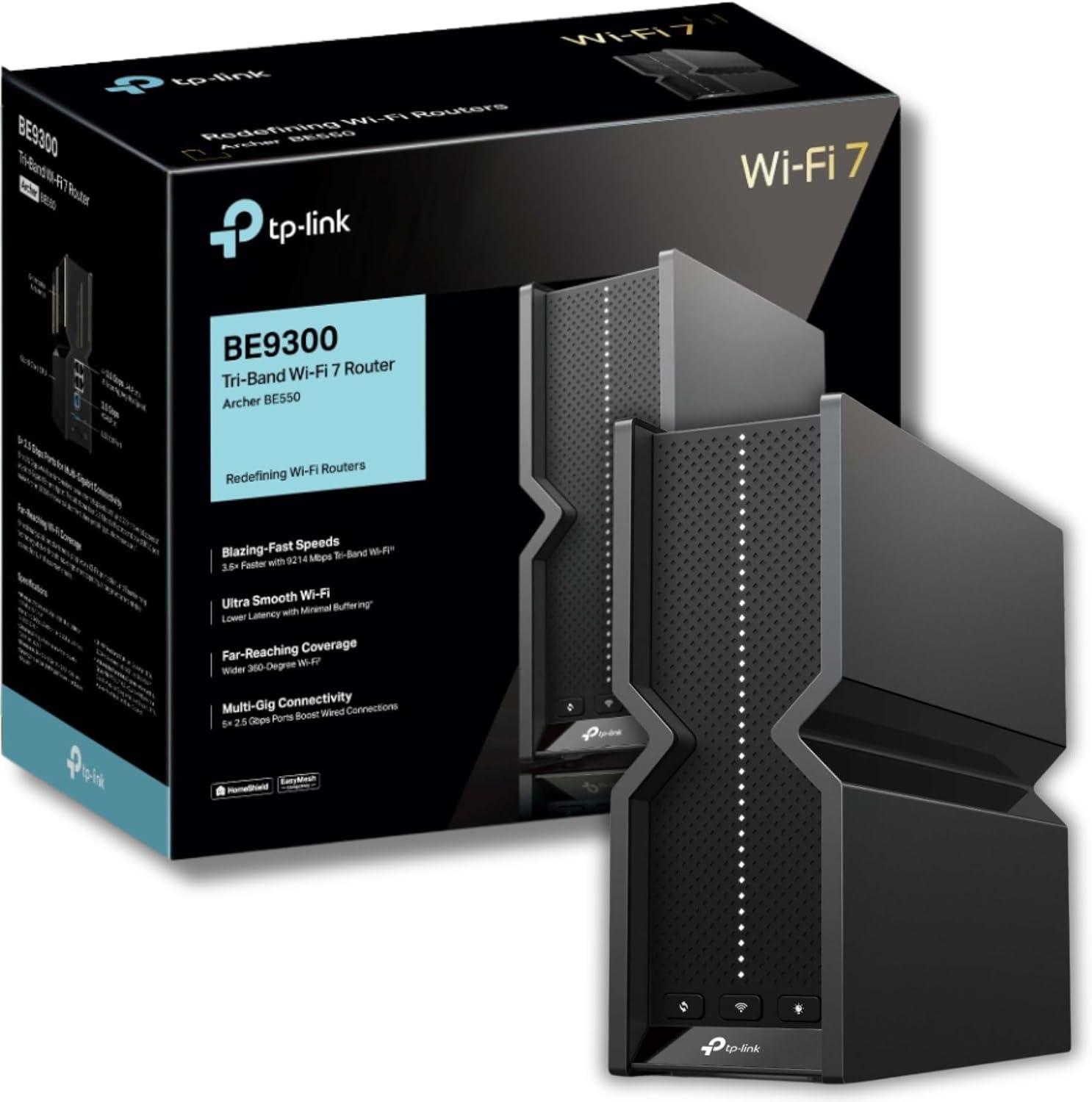
Best overall — TP-Link Archer BE550. Tri-band Wi-Fi 7 with fast ports and the best balance of performance and price in the field. It supports the 6 GHz band and MLO, has 2.5 Gbps ports, and — the part that matters day to day — wraps all of it in a genuinely polished app that is easy to navigate whatever your level of expertise. The one real complaint is physical: its vertical design will not suit every living room.
Most capable — AVM FRITZ!Box 5690 Pro. The most advanced router here, with a tri-band connection reaching up to 18.5 Gbps and a built-in base for smart-home devices. Its price places it squarely in specialist territory rather than general recommendation.
Best value Wi-Fi 7 — Cudy BE11000. Tri-band Wi-Fi 7 at a notably low outlay. The trade-off is the interface, which is not as refined as the bigger brands manage.
Cheapest way into Wi-Fi 7 — TP-Link Archer BE220. A genuinely inexpensive route to the current standard, provided you accept it is dual-band only.
Best mesh for a large home — Mercusys Halo H3600BE (2-pack). Covers up to 460 m² and more than 150 devices. Its interface is very basic, which is the compromise for the coverage.
Cheapest Wi-Fi 7 mesh — TP-Link Deco BE3600. A very stable connection helped by AI traffic management — but as a single unit it is not intended for large homes, so check what you are ordering.
Best on a tight budget — Tenda AX5700. Tri-band with mesh coverage and a well-made interface at an unbeatable outlay. The catch is in the name: AX means it is Wi-Fi 6E, not Wi-Fi 7.
Model names to check
TP-Link's range is easy to confuse. Alongside the Archer BE550 recommended here, UK listings carry the Archer BE700 and the Archer GE550 gaming model at similar or higher prices. The letters and digits are the whole difference — check them against what you actually intend to buy.
Before you buy
Four questions. Is your problem coverage or capacity? If the signal is fine nearby but dies at the far end of the house, that is a mesh problem, not a router problem. What do the letters say? AC means walk away. Can you get into your provider router's settings to enable bridge mode or disable its Wi-Fi? And do your devices support Wi-Fi 7 — because if none of them do, an AX model saves money with no practical loss today.
Research sources
Sources recorded for this page are linked below. Reported third-party testing belongs to the original publisher; it is not testing performed by Truthful Reviews.