HomeArticlesBest Laptops 2026: 55 All-Rounders Lab-Tested
Buying Guide

Best Laptops 2026: 55 All-Rounders Lab-Tested

We compare 55 lab-tested all-round laptops. The Samsung Galaxy Book6 Pro wins with a superb OLED screen; the aluminium Galaxy Book4 costs just 499 euros.

2 July 2026
10 min read
Best Laptops 2026: 55 All-Rounders Lab-Tested

The laptop market is vast and cluttered, but two questions cut through it: what will the machine be used for, and what should it cost? For everyday duty — browsing, streaming, office work, light photo editing — the all-rounder class delivers everything most people need, and this guide sorts it out with a laboratory test field of 55 benchmarked all-round notebooks. Below: the test winner, a genuinely good 499-euro price tip, the value pick of the field, an ultralight business flagship and the best machine under 1,000 euros, followed by the buying advice that separates the spec sheets.

Gamers and heavy creators shop in different classes — dedicated graphics, stronger cooling, dearer prices — and we cover that territory in our gaming PC guide. For the lightest kind of everyday computing, Chromebooks remain the budget alternative.

The Short Version

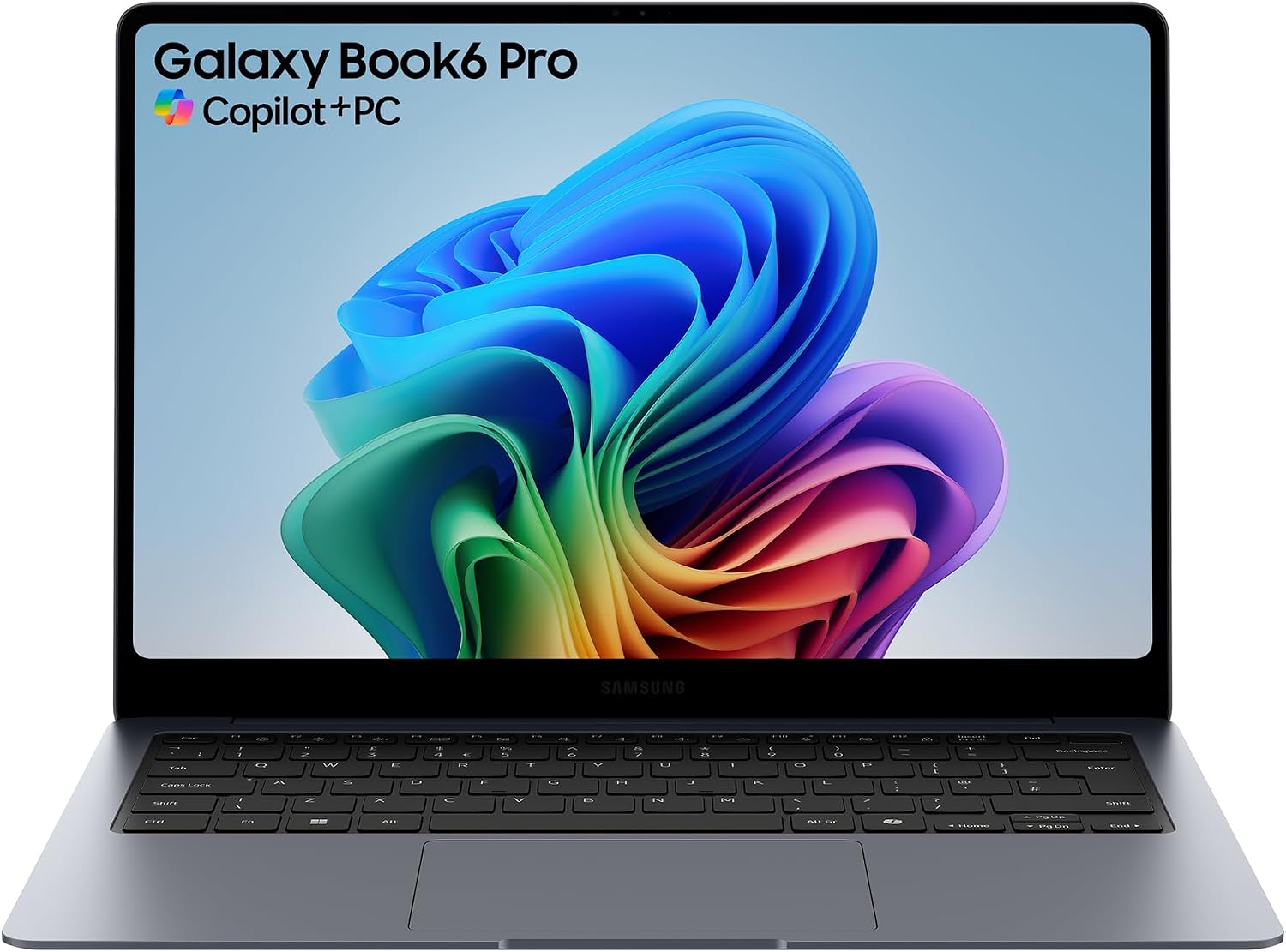
  • Test winner — Samsung Galaxy Book6 Pro. The field's best performance, display and handling grades in one 1.6-kilogram aluminium body: a 16-inch OLED touchscreen, 16-core power and 19 hours of video playback, graded "very good" (1.2), from around 2,299 euros.
  • Price tip — Samsung Galaxy Book4. An aluminium-built 15.6-inch starter notebook with solid benchmarks and generous ports for about 499 euros — "good" (2.5) with a "very cheap" value verdict.
  • Value alternative — Samsung Galaxy Book5 Pro 360. A convertible with a superb 16-inch OLED touchscreen, the field's best working endurance of 11:13 hours and a bundled stylus, "very good" (1.3) from around 1,099 euros.
  • The ultralight — Lenovo ThinkPad X1 Carbon G13. Under one kilogram of recycled carbon and magnesium around a bright anti-reflective OLED display — a business flagship priced accordingly, from about 3,723 euros.
  • Best under 1,000 euros — Lenovo ThinkBook 14 G7 ARP. A bright 14-inch screen, an excellent keyboard and a fingerprint sensor for around 822 euros, graded "good" (2.4).

The Winner: Samsung Galaxy Book6 Pro

The Galaxy Book6 Pro swept the test: perfect 1.0 grades for performance, display and handling, with equipment and battery at 1.4. The engine is Intel's 16-core Core Ultra X7 358H with 32 gigabytes of RAM and a 1-terabyte SSD, and the measurements put clear air between it and everything else in the field — 18,182 points in the PCMark 10 productivity benchmark where nothing else here cleared 11,000, and 368 frames per second in the 3DMark Night Raid graphics test. Remarkably, the fan stays very quiet even at full load.

The 16-inch OLED touchscreen runs a dynamic refresh rate up to 120 hertz, was measured at a bright 496 candela per square metre, and covers the DCI-P3 colour range almost completely — films look genuinely vivid. The one professional caveat: Adobe RGB coverage stops at 86 per cent, worth knowing for print-oriented photo editing. The speakers are excellent, with treble-forward clarity and proper bass, and the 1.5-centimetre case fits a USB-A port, two USB-C ports with Thunderbolt 4, and full-size HDMI 2.1, plus a good Full HD webcam, Wi-Fi 7 and Bluetooth 5.4. Battery life reached 18:53 hours of video and 9:41 hours of intensive work, and 30 minutes of charging buys about six hours of use.

The criticisms are small: the extremely flat keyboard offers merely acceptable typing feel and no number pad, and the underside edges are a touch sharp. At around 2,299 euros the value verdict says "expensive" — but as with its bigger sibling, the Galaxy Book 6 Ultra we reviewed separately, the hardware justifies the class. Verdict: "very good" (1.2).

The Price Tip: Samsung Galaxy Book4

At around 499 euros, the Galaxy Book4 is the honest budget recommendation of the field. The surprise starts with the case: high-quality, very stable aluminium — not typical for a 500-euro laptop. Inside, Intel's Core 3 100U with 8 gigabytes of RAM posts consistently good benchmark results for everyday work, and the 54-watt-hour battery ran 10:40 hours of Full HD video, with a battery-protection charging mode and a travel-friendly 150-gram charger as thoughtful extras.

Connectivity embarrasses dearer machines: two USB-A and two USB-C ports, HDMI, and a micro-SDXC card reader, enough to drive two external monitors. The savings surface at the panel: the matte 15.6-inch LCD in the old 16:9 format covers only 63 per cent of the sRGB colour range, stays modest at 296 candela and refreshes at 60 hertz — colours look visibly pale. The 256-gigabyte SSD fills quickly, the webcam is middling and the touchpad feels slightly tacky, though the keyboard is fine and the speakers produce a pleasantly rounded sound. Graded "good" (2.5) with a "very cheap" (1.2) value verdict, it is exactly what a starter notebook should be: solid where it matters, cheap where it shows.

The Value Alternative: Samsung Galaxy Book5 Pro 360

The Galaxy Book5 Pro 360 is the field's price-performance sweet spot. The 16-inch OLED touchscreen — this is a convertible whose display folds fully around, with a stylus included in the box — runs at 120 hertz, gets bright enough for sunlit rooms and covers the colour ranges almost perfectly. Endurance is outstanding: 18:54 hours of video and 11:13 hours of normal work, the best working runtime in the entire field, with 30 minutes of charging good for over six hours.

Intel's efficient Core Ultra 5 226V with 16 gigabytes of RAM delivers very good performance — fractionally weaker than its predecessor, a fair trade for the efficiency — and the fan stays discreet under full load. Ports are plentiful for a 1.4-centimetre chassis: two USB-C, one USB-A, HDMI and a card reader. The keyboard is shallow but crisp, the touchpad enormous, and the aluminium build handsome. The one real limit is the 512-gigabyte SSD in a machine otherwise built for years of service. Verdict: "very good" (1.3), with a "very cheap" (1.3) value rating from around 1,099 euros.

The Ultralight: Lenovo ThinkPad X1 Carbon G13

Lenovo's business flagship answers a different question: how much laptop fits under one kilogram? Built partly from recycled carbon fibre and magnesium, the X1 Carbon G13 pairs its featherweight with a bright 14-inch OLED display (measured 427 candela) whose heavily anti-reflective coating looks almost matte, and whose colour coverage is very good. It supports 120 hertz but ships at 60 to protect the battery — which runs 15:22 hours of video and 8:35 hours of work regardless.

Intel's Core Ultra 7 258V with 32 gigabytes of RAM and a fast 1-terabyte SSD posts very good benchmark results (performance grade 1.4), the keyboard is crisp and flat in the best ThinkPad tradition, the clickpad excellent, and the speakers powerful and clean. Four USB ports — two USB-A, two Thunderbolt USB-C — plus HDMI cover connections, though a card reader is missing; the webcam has a physical privacy cover and the hinge opens flat to 180 degrees. Two quirks: the flat fan produces a high-frequency note under load, and the price — around 3,723 euros — earns the field's bluntest value verdict ("very expensive", 5.3). For frequent flyers billing by the hour, it remains the tool of choice.

Best Under 1,000 Euros: Lenovo ThinkBook 14 G7 ARP

The ThinkBook 14 G7 was a genuine bargain at the time of testing — around 822 euros for a 14-inch aluminium-and-plastic machine with an AMD Ryzen 5 7535HS, 8 gigabytes of RAM and a 256-gigabyte SSD. The display is pleasantly bright at 357 candela but renders colours palely (48 per cent Adobe RGB coverage), and endurance is fair for the class: 9:48 hours of video, five and a half of proper work, with a battery-protection mode included.

The reasons to buy are tactile. The keyboard is excellent — crisp, quiet, rattle-free — the touchpad good if slightly imprecise on small movements, and the power button integrates a fingerprint sensor, not a given in this class. The fan ramps up gently but adds a high-frequency tone at sustained load, and the speakers ring slightly at maximum volume. Graded "good" (2.4), it is the sensible answer for buyers with a firm four-figure ceiling.

How Much Laptop Do You Need?

Memory and storage

Eight gigabytes of RAM is the sensible minimum for smooth Windows use, and an SSD is non-negotiable — conventional hard drives are slower and more failure-prone and have no place in a new laptop. From 128 gigabytes programs start quickly and data fits; the more demanding the workload, the larger both should be. For heavy multitasking — several applications and a forest of browser tabs — step up to 16 gigabytes of RAM and at least a 256-gigabyte SSD.

The processor

For video, browsing and email, an entry-class processor — Intel's Core i3 tier or an AMD Ryzen 3 — is entirely sufficient, and it needn't be the current generation: one or two generations back buys the same experience for less. Demanding office work points to the Core i5/i7 or Ryzen 5/7 tier, while CAD, gaming and video editing call for the top tier plus a dedicated graphics unit rather than the one integrated in the processor.

The Display Deserves No Compromise

Hours of daily staring make the panel the wrong place to save. Look for good brightness, a checkerboard contrast of at least 150:1, and colour coverage of at least 60 per cent of the sRGB range — passable, if pale; 100 per cent sRGB is the mark of neutral rendering. Creators should demand more: over 90 per cent coverage of Adobe RGB and DCI-P3, brightness beyond 300 candela and contrast beyond 170:1, ideally on an OLED panel. Resolution follows size — Full HD serves 14- and 15.6-inch machines perfectly; 4K only starts earning its premium from 17 inches, or in colour-critical image and video work.

Ports, Radios and the Rest

Match the connections to your life, not the brochure. An external monitor needs HDMI or DisplayPort over USB-C; USB sticks and external drives still need a classic USB-A port. Wi-Fi 5 is the workable minimum, Wi-Fi 6 the safer buy. Frequent travellers should weigh mass and measured battery life above all — and whatever the use, insist on a decent keyboard and touchpad, because poor input hardware makes even simple tasks miserable. Convertibles whose touchscreens fold fully around, like the Book5 Pro 360, add whiteboard and sketching duty; hardware privacy screens, mostly on business models, protect confidential work in train seats.

When the All-Rounder Class Is Not Enough

The machines above top out at demanding office work. CAD, serious video editing and modern gaming ask for a different recipe: a top-tier processor plus a dedicated graphics unit from the current or immediately previous generation, at least 16 gigabytes of RAM — 32 for workstation duty — and storage from 512 gigabytes to a terabyte, because both projects and games devour space. Creators should add a colour-accurate panel covering all three colour ranges above 95 per cent, brightness beyond 300 candela, and resolution matched to the work, trending towards 4K. Gamers should invert one instinct: a lower-resolution panel with HDR and a refresh rate of 144 hertz or more beats a 4K screen for fast titles, and keyboard and touchpad still deserve scrutiny even when an external mouse is a given. Complete systems built to that recipe live in our gaming PC guide.

How the Notebooks Were Tested

The test sorts machines into classes — all-rounders around the 1,000-euro mark, gaming, workstation/creator and premium — so that a budget laptop is never graded against a 4,000-euro flagship's expectations. Five part-grades feed the verdict, each normalised so the best device in a category sets the 1.0 benchmark. Performance is measured with practice-oriented benchmarks such as PCMark and 3DMark, weighted by class. Equipment counts memory, storage, ports, card readers and extras like fingerprint sensors. The display grade rests on measurements: maximum brightness and its distribution, contrast, pixel density and colour-space coverage. Handling combines build quality, noise, and hands-on keyboard and touchpad assessment, with weight judged relative to display size. Mobility measures battery life twice — video playback and office work — plus how much runtime 30 minutes at the charger restores.

Frequently Asked Questions

How much RAM does a notebook need?

At least 4 gigabytes for Windows 11, ideally 8 or more. Linux distributions can manage with less.

What is a dedicated graphics card?

A separate graphics processor — an Nvidia GeForce or AMD Radeon — instead of relying solely on the graphics integrated in the main processor. It raises performance in graphically demanding applications considerably and is essential for gaming and serious video work.

What do "M" and "Max-Q" mean on notebook graphics?

"M" simply marks the mobile version of a graphics card. Max-Q is Nvidia's design programme for slimmer laptops, letting manufacturers build flatter machines without sacrificing graphics performance.

Which resolution should the display have?

Full HD (1,920 × 1,080) is right for 14- and 15.6-inch machines. UHD/4K only pays off at 17 inches and beyond.

The Bottom Line

Fifty-five tested all-rounders produce a clear hierarchy. The Galaxy Book6 Pro wins everything that can be measured and most of what can be felt — for buyers who will pay flagship money for it. The Galaxy Book5 Pro 360 is the purchase most readers should actually make: 90 per cent of the winner's experience, the field's best working endurance and a bundled stylus for half the price. The Book4 proves 499 euros now buys aluminium build quality and honest performance, the ThinkBook 14 G7 adds the best keyboard of the budget class under 1,000 euros, and the X1 Carbon remains what it has been for a decade — the ultralight benchmark, priced for expense accounts. Buy the display and the battery measurements first; the processor tier will follow naturally from what you ask of it.

Share Your Experience

Please sign in to leave a comment

Sign In

Loading comments...