
Quick Specs
Our Verdict
A statement entry-level Mac: light, premium-feeling and fast enough for what most people actually do. Buy the 512GB model for Touch ID and headroom - and step up to an Air only if you push sustained creative work.
Research sources
Sources recorded for this page are linked below. Reported third-party testing belongs to the original publisher; it is not testing performed by Truthful Reviews.
Our editorial process
Research method, author and affiliate-independence details
Our editorial process
Research method, author and affiliate-independence details
Prepared by our editorial team using verified source material, product research, and a British-English editorial rewrite before publication.
- We review the working bundle for product facts, comparisons, and buyer-relevant tradeoffs before publishing.
- Non-English source material is translated into British English and rewritten into our house style without carrying over publication branding.
- Affiliate links and price references are handled separately from editorial judgements and never determine the verdict.
Read our full methodology: how we review
Affiliate links never determine our verdicts. Commercial relationships are disclosed separately from the editorial assessment, and we aim to keep buyer guidance clear, specific, and evidence-based.
Pros & Cons
Pros
- Genuinely affordable entry into macOS
- Premium aluminium build at 1.23kg
- Sharp, bright 13-inch 500-nit display
- Brisk everyday performance from the A18 Pro
- Excellent keyboard and trackpad for the class
- Good 1080p camera and surprisingly capable speakers
Cons
- 8GB RAM and no later upgrades
- Touch ID only on the 512GB model
- Second USB-C port is slow USB 2; no Thunderbolt or MagSafe
- Not built for sustained creative workloads
- sRGB-only panel, no ProMotion
Full Specifications
Key Features
Genuinely affordable entry into macOS
Premium aluminium build at 1.23kg
Sharp, bright 13-inch 500-nit display
Brisk everyday performance from the A18 Pro
Excellent keyboard and trackpad for the class
Good 1080p camera and surprisingly capable speakers
The MacBook Neo is a remarkable Mac. Not because it is especially fast, not because it meets professional demands, and not because Apple has fitted its best technology. It is remarkable for a different reason: it is probably the best Mac for most people — and the most interesting Mac Apple has made in years.
That sounds contradictory at first, because the Neo carries no powerful M-series chip like the MacBook Air, MacBook Pro, Mac mini or iMac. Instead, Apple uses the A18 Pro — a chip with its roots in the iPhone 16 Pro — alongside 8GB of unified memory, a 256GB or 512GB SSD depending on configuration, a 13-inch Liquid Retina display and a reduced set of ports. On paper that reads like a bare entry-level machine. In practice, it is precisely this reduction that makes the MacBook Neo so compelling: it concentrates on what most people actually do with a laptop — writing, browsing, email, spreadsheets, presentations, streaming, video calls, iCloud, sorting photos and the occasional image edit. None of that needs a MacBook Pro. Often it does not even need a MacBook Air.
What Is the MacBook Neo?
The Neo is Apple's new entry notebook, positioned below the MacBook Air and aimed squarely at anyone who wants a cheap, light, uncomplicated Mac. It comes in several colours including silver, pink, citrus and indigo. The aluminium-housed machine carries a 13-inch display at 2408 x 1506 pixels with 500 nits of brightness and sRGB coverage — no P3 wide colour, no 120Hz ProMotion, no mini-LED. It is not a MacBook Pro panel, but in daily use it is sharp, bright and pleasant: text is crisply legible, photos look respectable, and for streaming and video calls the quality is entirely sufficient. Only those who edit photos colour-critically or grade HDR material should look elsewhere.
Design and Build
Apple does here what Apple does best: the Neo does not feel like a cheap laptop. The case is rigid, cleanly finished and genuinely premium — a big advantage in this price class, where many budget Windows machines skimp on materials, hinges, trackpads or keyboards. At 1.23 kilograms it slips easily into any bag, making it a natural fit for school, university, commuting and travel. It recalls Apple's old 12-inch MacBook, which fascinated as an ultra-mobile Mac but was priced too close to the Air; the Neo feels like that same idea, finally positioned correctly.
Keyboard, Trackpad and Touch ID
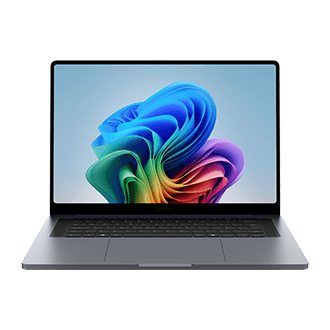
The keyboard is typical Apple — short travel, precise actuation, comfortable for long writing sessions. The trackpad is another highlight: precise and dependable, close to the feel of far more expensive Macs, where budget notebooks so often stumble. One catch: Touch ID is reserved for the better-equipped 512GB model. The base configuration goes without, and the fingerprint sensor is one of those conveniences — unlocking, password autofill, purchase confirmation — that is quickly missed. Anyone planning to keep the Neo for years should seriously consider the 512GB version.
Camera and Speakers
The 1080p FaceTime HD camera is a plus, making video calls look respectable, and the microphones handle meetings fine. The speakers are better than the price class would suggest — not as room-filling as the larger MacBook Pro models, but surprisingly good, and better than those of Apple's expensive Mac Studio. For YouTube, podcasts and FaceTime they suffice; for music and films, headphones remain the better choice, as almost always.
Performance: The A18 Pro Surprises Without Performing Miracles
The most intriguing part is the chip. The A18 Pro comes from Apple's iPhone world, running here with a 6-core CPU, 5-core GPU, 16-core Neural Engine and 60GB/s of memory bandwidth. On paper that trails any current M-chip clearly; in everyday use the Neo feels brisker than many will expect. Apps launch quickly, Safari runs smoothly, multiple tabs and office applications pose no problem. Anyone who mainly writes, researches, streams and manages email will rarely feel they are using a slow Mac — a testament to how tightly macOS and Apple's own silicon are tuned to each other.
Still, the A18 Pro should not be overestimated. The Neo is no disguised MacBook Pro. Light photo editing in Pixelmator, Affinity Photo or Photos works fine, and occasional RAW processing is possible with patience — but large batches, many layers, AI features or big exports take noticeably longer. Video makes the boundary clearer still: short clips and simple cuts for holiday or social media footage are fine, but anyone regularly cutting 4K material with multiple tracks and colour correction should choose a MacBook Air or go straight to a MacBook Pro.
Memory and Storage
Eight gigabytes of unified memory is no longer generous. Apple's efficient memory management hides a lot, but cannot work magic: heavy multitaskers with many tabs, messengers, cloud services and image editing running simultaneously can push the Neo to its limits. The SSD matters even more. The 256GB base model is keenly priced but tightly calculated — macOS, apps, photos and downloads fill it faster than expected. Since neither storage nor memory can be upgraded later, buyers planning to keep the machine four to six years are better served by the 512GB version, which also brings Touch ID.
Ports and External Displays
Connectivity is one of the clearest differences from the MacBook Air. The Neo offers two USB-C ports — but only one supports USB 3 at up to 10Gbit/s with DisplayPort; the other is USB 2 at 480Mbit/s, fine for a mouse or charging but unsuitable for fast external SSDs. A 3.5mm headphone jack completes the line-up; there is no MagSafe and no Thunderbolt. External displays are supported up to 4K at 60Hz, which covers most users — but anyone working with multiple monitors, docking stations or fast peripherals hits the limits much earlier than with an Air or Pro. For a primarily desk-bound main machine, the Air is the safer choice.
Battery Life and Charging
Apple quotes up to 16 hours of video streaming and up to 11 hours of wireless browsing — laboratory figures, naturally, but in everyday use the Neo comfortably gets through a normal working or university day as long as it is not under constant load. Charging works over standard USB-C, so an existing charger of sufficient wattage does the job.
Verdict
The MacBook Neo is the rare entry-level product that feels like a statement rather than a compromise. By building around the A18 Pro and trimming the extras, Apple has produced a light, beautifully made, genuinely affordable Mac that handles what most people do every day without complaint. Power users will rightly step up to an Air or Pro for sustained creative work, faster ports and more memory — but for writing, browsing, streaming and everyday life, this is the best Mac for most people, and the most sensible cheap Mac Apple has ever sold. Choose the 512GB version for Touch ID and breathing room, and it should serve happily for years.
Frequently asked questions
MacBook Neo vs MacBook Air — what's the real difference? The chip class: the Neo carries no M-series processor like the Air, Pro, Mac mini or iMac — instead it runs the A18 Pro, a chip with its roots in the iPhone 16 Pro, paired with 8 GB of shared memory. Externally the two are strikingly close; our MacBook Neo analysis sets the chassis side by side, and our MacBook Air M5 review covers what the M-class buys you.
What are the MacBook Neo's core specs? The A18 Pro processor, 8 GB of shared memory, a 256 or 512 GB SSD depending on model, a 13-inch Liquid Retina display and a deliberately reduced port selection.
Is the MacBook Neo worth buying? The test's own framing answers it: probably the best Mac for most people and the most innovative Mac in years — precisely because it trades the M-chip for a price most people can justify. Buyers who need sustained heavy compute belong with the Air or Pro instead.
Ready to Purchase?
Check current prices and availability
Affiliate Disclosure: As an Amazon Associate I earn from qualifying purchases. Truthful Reviews may receive a commission when you buy through eligible Amazon UK or Amazon US links, at no extra cost to you. Affiliate partnerships never determine our verdicts or recommendations.