HomeArticlesBest Chromebooks 2026: 49 Compared, One Clear Winner
Buying Guide

Best Chromebooks 2026: 49 Compared, One Clear Winner

The best Chromebooks of 2026 from a 49-model comparison: the silent, OLED-equipped Lenovo Chrome 14M9610 wins outright, with the Samsung Chromebook Plus 15, 300-euro Lenovo Duet 11 and luxury Acer Spin CP714 covering every need - plus the full ChromeOS buying guide.

11 June 2026
13 min read
Best Chromebooks 2026: 49 Compared, One Clear Winner

Chromebooks have matured from a niche curiosity into a genuine alternative to the classic Windows laptop, and the market share now shows it. After examining 49 current models, one machine stands out as the best for most people: the Lenovo Chrome 14M9610, with premium build quality, high computing power in silent operation, exceptional battery life and a glorious OLED display.

The Short Version

The Lenovo Chrome 14M9610 wins the comparison outright. The Samsung Chromebook Plus 15 is the display-first alternative, the Lenovo Chromebook Duet 11 takes the price tip at around 300 euros, and the Acer Chromebook Plus Spin CP714-1HN serves the luxury class with Thunderbolt 4, tablet mode and a stowable stylus.

Why ChromeOS at All

Hardware-wise, most Chromebooks barely differ from typical Windows or Linux laptops; the distinction is Google's ChromeOS, built around the browser of the same name and remarkably frugal — which is why even cheap, modest hardware feels brisk. The system's quiet superpowers are maintenance ones: updates install almost invisibly in the background rather than demanding restarts, Google guarantees up to eight years of system updates for current models (with every device's support window listed on a public page), and unlike Android, manufacturers may not skin the interface or preload third-party clutter — every ChromeOS machine behaves identically out of the box. Add a robust security architecture with encryption and efficient malware protection, and the platform suits anyone who wants to spend as little of their life as possible maintaining a computer.

The App Question: Android, Linux and Even Windows

ChromeOS began as a pure web-app terminal and its centre of gravity remains the browser — top-shelf software such as the full Microsoft Office suite, most Adobe applications and countless niche tools still do not exist natively. The gaps have narrowed dramatically, though. Every current Chromebook installs and runs Android apps from the Play Store, which works especially well on touchscreen models and brings mobile versions of the big productivity packages — Lightroom, the Office apps — onto the laptop; since Google refocused Android on tablets, those apps keep getting better on large screens, one reason 2-in-1 designs feel the most future-proof. Microsoft, after years of blockade, now integrates its 365 services far more cleanly via the cloud, even without native Word.

Power users can enable Linux support: officially still beta, in practice very solid, and transformative once LibreOffice or GIMP joins the machine. Honest caveats apply — initial setup is not trivial, app installation routes through the command line, and the Android/Linux interplay remains imperfect — so a Linux-curious temperament helps. And at the top end, the ChromeOS version of Parallels runs full Windows in a virtual machine on higher-class hardware (Intel Core i or Ryzen, at least 8 gigabytes of RAM). The platform that once did nothing but browse now has four software ecosystems.

Gaming and Entertainment

Streaming media is as effortless as on any platform — every relevant service works in the browser or via its Android app. Gaming needs more nuance: most Chromebooks are deliberately modest machines, so demanding native PC games are simply absent. Cloud streaming fills the gap impressively given a stable connection: GeForce Now and Blacknut run superbly, the Android Game Pass app streams hundreds of titles with an Ultimate subscription, and thousands of Android games — up to and including Genshin Impact, the classic Infinity-Engine RPGs and Civilization VI — run locally. A dedicated gaming laptop this is not, and serious mobile gamers should buy one; everyone else has more to play than expected.

What "Chromebook Plus" Guarantees

Google's 2023 Chromebook Plus initiative draws a hard line under the bargain bin: the badge requires at least a 12th-generation Intel i3 or AMD Ryzen 5000, 8 gigabytes of RAM, 128 gigabytes of SSD storage and a Full-HD display, from around 350 euros. Plus models also unlock exclusive AI features in ChromeOS — text drafting, correction and summarising, image editing, webcam enhancement — plus offline file sync for Google Drive and the Gemini assistant as a standalone app. For buyers, the badge is the simplest filter against underpowered regret.

Who Should Buy a Chromebook — and Who Should Not

Good Chromebooks excel above all as affordable, mobile second machines beside a home desktop PC — and for people whose computing life happens substantially online, they serve perfectly well as the only computer. The old cliché of a toy for Google fans has been obsolete for years. The honest exclusion list is short but firm: anyone whose work depends on full desktop Office, the Adobe suite or specialist Windows tools; photographers and video editors needing colour-critical displays and horsepower; and gamers who want local AAA titles. Everyone else — students, writers, browsers, streamers, email-and-spreadsheet households — gets more comfort per euro here than anywhere in the Windows aisles.

Offline Use, Honestly Assessed

The cloud-first reputation deserves updating. ChromeOS has long supported a proper local file system, Google Drive files sync automatically for offline editing on Plus models, Gmail and Docs work offline once enabled, and Android apps run locally by nature. A Chromebook on a train is no longer a brick — but storage sizes of 128 to 256 gigabytes still assume the cloud carries your archive, and buyers with big local media libraries should either think in microSD terms (where a reader exists) or look elsewhere.

Understanding the Update Clock

Google's up-to-eight-years promise has one subtlety worth knowing: the clock starts from the platform's release, not from your purchase date. A model that has already sat two years on shelves carries correspondingly less remaining support — and since every device's exact end date is published on Google's support list, checking it before purchase takes one minute and prevents the classic bargain-bin mistake of buying a heavily discounted model with eighteen months of updates left. All recommendations here are current-generation machines with long runways.

Test Winner: Lenovo Chrome 14M9610

Build and display

The 14M9610 convinces from first touch: a predominantly metal housing (only the base plate is plastic), excellent workmanship — and just 1,170 grams, among the lightest laptops anywhere, in compact 31.4 x 21.9 x 1.6-centimetre dimensions. The 14-inch size hits the sweet spot of portable yet workable. The 1,920 x 1,200 touch display in 16:10 format is the star: OLED technology brings outstanding colours and contrast, 100 per cent sRGB coverage with very high colour accuracy — far from a given on Chromebooks — and above-average brightness around 380 nits. Like most glossy screens it dislikes the outdoors; indoors it is simply the best panel in its class. Refresh stays at the usual 60 hertz.

Inputs and extras

The backlit keyboard types long texts comfortably, the touchpad is properly sized, and the touchscreen navigates ChromeOS smoothly. The 5-megapixel webcam beats comparable machines and even includes an integrated privacy cover; the speakers surprise for a laptop this thin.

Performance and battery

Lenovo fits MediaTek's brand-new Kompanio Ultra 910, an ARM chip developed specifically for Chromebooks that fully matches the usual Intel and AMD options in Chrome workloads — while needing no fan at all. The machine is perfectly silent; only sustained heavy load warms the underside noticeably, and ordinary office or streaming use never does. The efficiency pays compound interest: up to 16 hours of mixed use at reduced brightness, beating every Chromebook in the comparison. A generous 16 gigabytes of DDR5 RAM keeps multitasking smooth; the 256-gigabyte UFS storage is quicker than common eMMC, slower than a real SSD, and entirely sufficient for ChromeOS — though it cannot be expanded.

Connections

Two USB-C ports (5 gigabits per second, Power Delivery, DisplayPort Alt Mode) enable single-cable docking and monitor use, joined by one USB-A and a 3.5-millimetre jack. Wi-Fi 7 and Bluetooth 5.4 make the wireless side cutting-edge.

Weaknesses

The wish list is short: no microSD reader (the Samsung has one), USB capped at 5 gigabits per second where the luxury Acer offers Thunderbolt 4, no tablet mode — and a price a notch above the average Chromebook, fully justified by the package.

Display Alternative: Samsung Chromebook Plus 15

Anyone who wants the best screen without convertible ambitions lands here. Samsung's own AMOLED panel delivers magnificent colours and superb black levels at around 410 nits, in a 15.6-inch Full-HD 16:9 format that needs no more resolution at this size. The Intel Core 3 100U — two performance plus four efficiency cores — handles streaming, office work and browsing briskly with reserves for future updates, supported by 8 gigabytes of DDR5 and a 256-gigabyte SSD (a real one, unlike many rivals' flash). Connectivity impresses for a 1.2-centimetre-thin machine: USB-A, two USB-C with Power Delivery and DisplayPort, HDMI 1.4, audio jack and a (slowish) microSD reader, plus Wi-Fi 6 and Bluetooth 5.3. At 1,200 grams it undercuts many 14-inch machines despite the bigger panel. The trade-offs: no touchscreen, no tablet mode, and a slightly higher price.

Price Tip: Lenovo Chromebook Duet 11

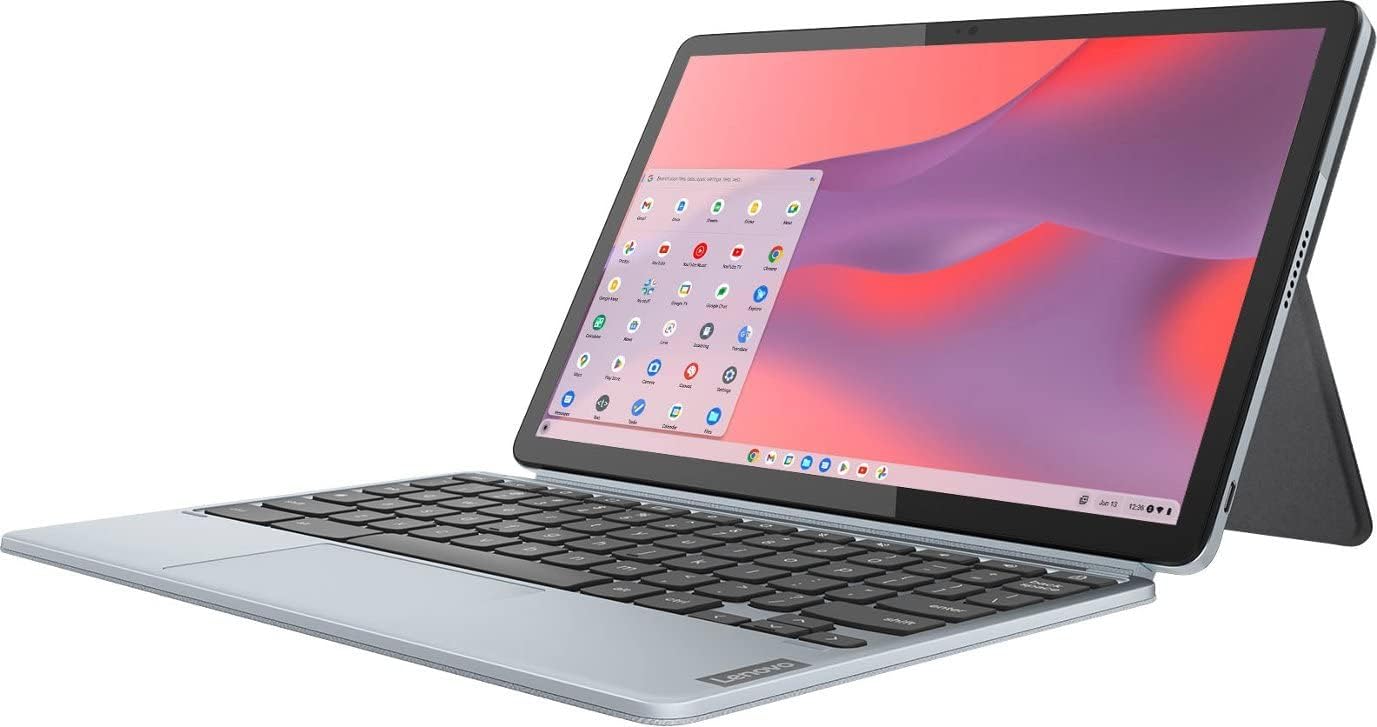
Around 300 euros buys Lenovo's tablet-with-keyboard concept: an 11-inch, 500-gram metal tablet (940 grams with the magnetic keyboard and back cover) roughly the size of an iPad Air, with a sharp 1,920 x 1,200 IPS display around 400 nits. The MediaTek Kompanio 838 and 8 gigabytes of RAM cover office work, study and media comfortably — an iPad Air it is not, and high-end apps exceed it — while 128 gigabytes of flash storage suffice for cloud-centric use. The keyboard's short travel suits notes better than novels, two USB-C ports (5 gigabits per second, Power Delivery, DisplayPort) plus an audio jack cover connections, and stylus input works although no pen ships in the box. ARM architecture makes Linux apps awkward; Android apps are its natural habitat. As a versatile, affordable all-rounder with a genuine tablet mode, nothing nearby touches it.

Luxury Class: Acer Chromebook Plus Spin CP714-1HN

At the top, Acer's convertible earns its place with magnificent equipment and premium workmanship: Thunderbolt 4 connectivity, a full tablet mode with stylus support and a storage slot for the pen, and a large touchpad. The price of ambition is weight — it is comparatively heavy. For anyone who wants a Chromebook to behave like a do-everything premium convertible, this is the ceiling of the current market.

The Comparison Field in Detail

Asus Chromebook CX1505

The budget pick for non-tablet buyers leaves surprisingly little behind: a touchscreen survives the price cut, the Intel Core 3 N355 paired with 8 gigabytes of RAM handles practically every ChromeOS application, and only the 128-gigabyte flash storage feels tight — irrelevant for cloud-centric users. At its price, nothing in the field offers a rounder package.

Asus Chromebook CX1405

Essentially the CX1505's compact 14-inch sibling with identical internals; the display is somewhat dimmer and loses touch input. Battery life around eleven hours sits comfortably in the good average and survives a full working day. For bag-weight minimisers on a budget, it is the CX1505 argument in a smaller shell.

Acer Chromebook CB315-6H

A cheap 15.6-inch machine for simple tasks with an unremarkable Full-HD, non-touch display. The performance covers office, streaming and browsing, but 4 gigabytes of RAM punish anyone who hoards tabs or apps, and a microSD reader is absent. At near-identical money the Asus CX1505 is simply better equipped.

Acer Chromebook Spin 714 (2023)

The outgoing premium convertible demonstrates how close Chromebooks run to Windows machines: a comparatively powerful processor, a bright 380-nit display with above-average colour, two genuine Thunderbolt 4 ports enabling fast external storage and three-monitor setups via the extra HDMI socket, excellent aluminium workmanship, stable hinges and a bundled stylus. Its fatal flaw is commercial: as a run-out model it now lists beyond 1,000 euros — admire the engineering, refuse the price, and let its successor inherit the recommendation.

Acer Chromebook Spin 312

Especially compact at 12.2 inches though not especially thin, the Spin 312 suits note-taking and light writing — and little more. Its frugal four-core Intel chip, 4 gigabytes of RAM and very small flash storage are outpaced by nearly everything else in the comparison; the touchscreen cannot fold or detach despite the convertible-suggesting name. Similar money buys distinctly more elsewhere in this list.

Asus Chromebook CM3001

A detachable like the Duet 11 — keyboard off, tablet on — but trailing Lenovo's execution closely enough that the Duet remains the pick of the format.

What Else Was Considered

These models cycle in and out of availability quickly — the detailed verdicts above reflect the configurations actually compared, with exact model numbers mattering more than family names.

How This Comparison Stays Honest

A living comparison of 49 machines demands constant pruning, and the update history tells its own story about this market. The previous favourite, Lenovo's IdeaPad Flex 5i 14, lost its place not to a better rival but to vanishing availability; the former luxury pick, the first Acer Spin CP714 generation, aged into an overpriced run-out model and was replaced by its successor; the old price tip yielded to the Duet 11 purely because its street price fell. Chromebook shoppers should internalise the pattern: this market moves on availability and price as much as on merit, configurations churn within model families, and a recommendation's exact model number — listed here for every pick — matters more than its marketing name. Five or more new machines enter the comparison with each revision, and former recommendations are retired to the candidates list rather than silently deleted, so the reasoning stays auditable.

Displays, Sizes and Formats Across the Field

The field clusters into three practical formats. Eleven-to-twelve-inch detachables and compacts — the Duet 11, the Spin 312, the CM3001 — prioritise portability and tablet duty, with 16:10 panels around 400 nits at the good end. Fourteen-inch all-rounders dominate the midfield and the podium: the winner's OLED at 380 nits with full sRGB coverage is the standout, while budget fourteens accept dimmer, non-touch IPS panels as their price of entry. Fifteen-to-sixteen-inch machines trade portability for desk comfort, from the Samsung's AMOLED showpiece down to the CB315's merely adequate panel — and one comparison entrant even brings a 120-hertz 16-inch display aimed at cloud gaming, with a large SSD but no touchscreen. Across every size, glossy finishes remain the rule, so outdoor workers should temper expectations regardless of brightness figures.

Performance Tiers, Decoded

Three engine classes power the field. ARM chips — MediaTek's Kompanio line in the winner and the Duet — bring silence, efficiency and outstanding battery life, with the new Kompanio Ultra 910 proving ARM now matches mainstream Intel and AMD in Chrome workloads; their one cost is awkward Linux compatibility. Entry Intel silicon (N-series, Core 3 100U) anchors the budget and midfield, entirely adequate for ChromeOS with 8 gigabytes of RAM, exposed only when buyers pair it with 4 gigabytes — the single most common false economy in the field. Full Core i and Ryzen processors populate the premium tier, where they unlock Parallels-based Windows virtualisation and Thunderbolt platforms. Storage tiers track the same ladder: eMMC flash at the bottom, faster UFS in the winner, real SSDs from the Samsung upward — all sufficient for ChromeOS, with the differences felt mainly in large file work.

Buying Advice

Three practical filters cut the 49-model haystack quickly. First, insist on the Chromebook Plus badge unless the price is genuinely trivial — the minimum spec it guarantees is exactly the floor below which ChromeOS stops feeling effortless. Second, mind the configuration jungle: most models ship in multiple variants differing in storage and even processor, so verify the exact model number rather than the family name. Third, prefer 2-in-1 or touch designs where the budget allows — Android apps keep improving on large screens, and convertibles harvest that future free. Buyers weighing a different ecosystem entirely should read our Apple MacBook Neo review — the budget Mac makes a fascinating counter-offer at a similar price to the premium Chromebooks.

Frequently Asked Questions

Can a Chromebook replace a Windows laptop?

For browser-centred lives — mail, documents, streaming, banking, study — comfortably yes, with the bonus of silence, stamina and zero maintenance. For dependency on specific Windows desktop software, no; the Android and Linux routes patch many gaps, and Parallels adds true Windows on high-end models, but a machine bought to run Windows software should simply run Windows.

How long does a Chromebook last?

Hardware-wise these are conventional laptops; software-wise the published update end-date is the real lifespan, after which the machine keeps working but stops receiving security patches. Buy current generations and the runway approaches eight years — longer than most Windows laptops receive meaningful support in practice.

Do Chromebooks work with normal accessories?

Almost universally: USB-C docking stations, external monitors via DisplayPort Alt Mode or HDMI, ordinary mice, keyboards and headsets all behave exactly as on any laptop, and the winner's twin USB-C ports make single-cable desk setups trivial.

The Bottom Line

The Lenovo Chrome 14M9610 is that rare comparison winner with no asterisk: silent, 16-hour stamina, an OLED screen that embarrasses the class, and build quality from a category above. The Samsung Chromebook Plus 15 wins the pure-display vote, the Duet 11 makes 300 euros feel generous, and the Acer Spin CP714-1HN exists for those who want everything. Whichever you choose: check the support end-date on Google's list, buy the Plus badge, and let the cloud carry what the storage will not.

Share Your Experience

Please sign in to leave a comment

Sign In

Loading comments...