A wireless mouse for work is a boring purchase that goes wrong in predictable ways: it will not pair with the tablet, the dongle occupies the only free USB port, the batteries die mid-meeting, or the click is loud enough to annoy the room. A group test of wireless mice sorts the field by those practical failures rather than by sensor specifications, which for office use barely matter.
First decision: dongle or Bluetooth
Wireless mice split into two types, and the difference determines what you can actually use them with.
USB receiver models ship with a dongle that talks to the mouse over 2.4 GHz radio, usually on USB-A though some now use USB-C. Not all dongles are equal. Logitech ships both simple receivers that work only with the mouse they came with, and multi-device receivers that handle several keyboards and mice at once — the technology was called Unifying and is now Logi Bolt, with added security features aimed at business use. Encrypted connections are increasingly standard: Logitech's Logi Bolt, Cherry, and Dell's Secure Link all offer links secured with AES-128.
Bluetooth models need no port at all, which is the deciding factor if you also want the mouse to work with a tablet, a phone or a thin laptop that has almost no connectors.
Many mice now offer both, and the genuinely useful specification to check is how many devices one can be paired with simultaneously. Some hold a single connection; others hold three and switch between them with a button. If you move between a work laptop, a personal machine and a tablet, that number matters more than anything on the sensor spec sheet.
Second decision: what the sensor actually needs to do
Unlike gaming mice, office mice do not need high-performance sensors, and manufacturers frequently do not even state which sensor is fitted. What they do need is to be accurate enough for precise clicking and fast enough for a large monitor.
That second requirement is what DPI measures — dots per inch, meaning how many pixels the cursor travels when you move the mouse one inch. A higher DPI means less physical movement to cross the screen, which matters increasingly with 4K, UHD and ultrawide displays, simply because there are more pixels to cross. 1,000 DPI is the modern minimum for comfortable use on a high-resolution screen, and the testers' view is that a good mouse should reach up to about 4,000 DPI to cover varied use cases. Beyond that, more is a preference rather than a requirement for office work — and the headline figure on the box is often not what you get out of the box, as the productivity pick below demonstrates.
The picks
Best for most people — Logitech Signature M650 L. The test winner, and the recommendation for the majority of buyers. It comes in two sizes, several colours and a genuine left-handed version, which is rarer than it should be. The click is pleasantly quiet, the sensor is precise, and it sits well in the hand. The SmartWheel scrolls long pages quickly and smoothly, and horizontal scrolling is available through a simple button combination.
The battery figure is the standout: at average working use, one replaceable AA battery lasts more than a year. It connects by Bluetooth or via a secure USB-A Logi Bolt dongle. Its one real limitation is that it pairs with a single device rather than the three some rivals manage — which the testers judged to matter only in exceptional cases.
Best multi-device alternative — Trust Ferro. A good alternative to the winner with a few extra tricks and no manufacturer software to configure. You get three pairings instead of two, preset DPI steps switchable by a button, and a side-tilting aluminium scroll wheel. Battery life is long, though it takes two batteries rather than one. The trade-offs are limited configuration options and a sensor that is not quite as precise as the winner's.
Best for Mac — Apple Magic Mouse. If you work on an Apple computer this is the sensible choice: plain, unobtrusive, and with no visible buttons at all, since the touch surface serves as both one- and two-button mouse. Horizontal scrolling is supported and operation is simple. Three caveats: the touch surface takes acclimatisation, it suits Windows users poorly because some gestures are unavailable there, and it cannot be used while charging.
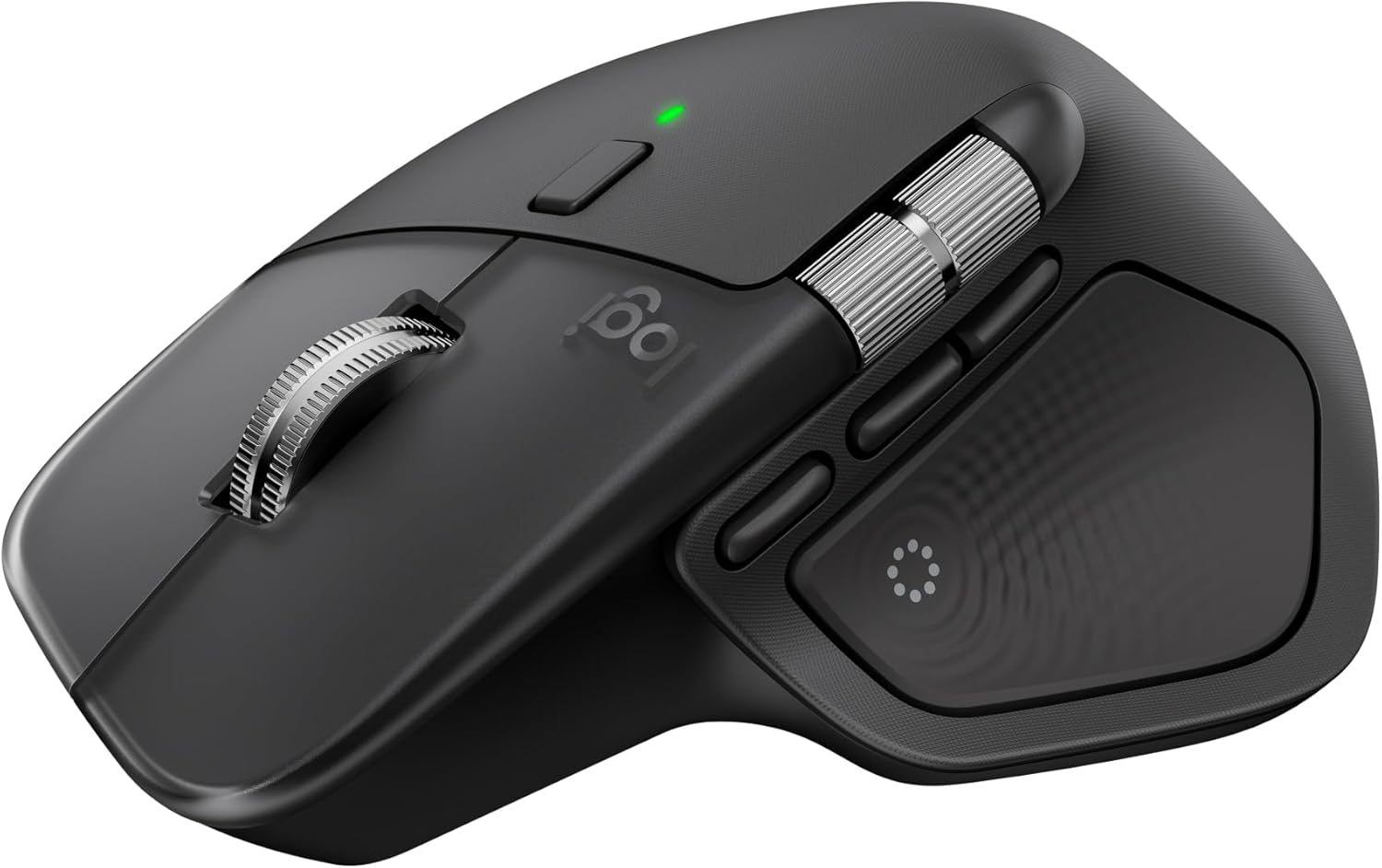
Best for productivity — Logitech MX Master 4. If output matters more than outlay, this is the one. It is gently ergonomic without demanding the adjustment a vertical mouse requires, and alongside the range's signature horizontal thumb wheel it adds four programmable thumb buttons. The button set into the thumb rest provides haptic feedback with adjustable vibration levels, and a Mac variant is available. It pairs with three devices at once — one over the dongle, two over Bluetooth — switched by an Easy-Switch button underneath, and the USB-C dongle stows inside the mouse's own USB-C port rather than needing a compartment.
Its sensor illustrates the DPI point above neatly. Logitech fits a Darkfield sensor rated to 8,000 DPI, but that ceiling only becomes available once you install Logi Options+. Out of the box it defaults to 1,000 DPI with a maximum of 4,000 DPI — which, by the standard set earlier, is already all an office mouse needs.
Against it: the button surface is not especially durable, it ships with a USB-C dongle only, which older machines short of USB-C ports may not welcome, and haptic feedback support is limited to certain applications. We have a full review of the MX Master 4 with more detail.
One thing the spec sheet will not tell you
Weight and glide are rarely advertised and made a measurable difference in testing. The Cherry Stream Mouse Comfort weighs 143 g with its battery fitted, and combined with only moderate glide that told over a long session. The Dell MS900 is 134 g, and its glide was judged acceptable but no better — again largely down to the mass being pushed around.
Neither is a bad mouse, but the pattern is worth knowing: a heavier body with unremarkable feet is the combination that makes a mouse tiring rather than any sensor shortcoming. If you can, put a hand on one before buying.
How to choose
Work backwards from your desk. If the mouse only ever serves one computer, the winner is the straightforward answer and its year-plus battery life removes a recurring annoyance. If it needs to serve a laptop, a tablet and a desktop, buy for the number of simultaneous pairings. If you are on a Mac and value the look, the Magic Mouse is designed for exactly that and poorly suited to anything else. And if you spend all day in the mouse, the extra thumb buttons on the MX Master are the feature that repays the outlay.
One specification worth ignoring: a very high DPI figure. Above the 1,000 threshold it is a preference, not a performance advantage, for anything short of gaming.
Search current listings: wireless mice on Amazon UK | Amazon.com. Multi-device alternative: Trust Ferro on Amazon UK | Amazon.com. Productivity pick: MX Master 4 on Amazon UK | Amazon.com.
Research sources
Sources recorded for this page are linked below. Reported third-party testing belongs to the original publisher; it is not testing performed by Truthful Reviews.