
Quick Specs
Our Verdict
Generation by generation Microsoft keeps refining the silhouette of its Surface laptops, and this eighth iteration is elegant and genuinely pleasant to use for everyday office tasks. The old failings are still present, though: performance is held back by the compact chassis, the IPS panel lacks precision, and there is virtually no scope for upgrades.
Research sources
Sources recorded for this page are linked below. Reported third-party testing belongs to the original publisher; it is not testing performed by Truthful Reviews.
Our editorial process
Research method, author and affiliate-independence details
Our editorial process
Research method, author and affiliate-independence details
Prepared by our editorial team using verified source material, product research, and a British-English editorial rewrite before publication.
- We review the working bundle for product facts, comparisons, and buyer-relevant tradeoffs before publishing.
- Non-English source material is translated into British English and rewritten into our house style without carrying over publication branding.
- Affiliate links and price references are handled separately from editorial judgements and never determine the verdict.
Read our full methodology: how we review
Affiliate links never determine our verdicts. Commercial relationships are disclosed separately from the editorial assessment, and we aim to keep buyer guidance clear, specific, and evidence-based.
Pros & Cons
Pros
- Solid, elegant chassis with no keyboard flex
- Excellent keyboard and haptic trackpad
- Respectable speakers for a 13-inch machine
- Enough performance for everyday office work
- Decent battery life from a small cell
- Noise under load in line with comparable ultraportables at 38 dB, and a cool underside
Cons
- Thicker and heavier than its closest rival
- IPS panel is only moderately well calibrated, with a warm colour temperature
- Integrated graphics run out of steam in games and heavier creative work
- 4K CPU video export scored well below expectations
- Almost no scope for upgrades beyond the battery
- Proprietary Surface Connect charger sold separately
Full Specifications
Key Features
Solid, elegant chassis with no keyboard flex
Excellent keyboard and haptic trackpad
Respectable speakers for a 13-inch machine
Enough performance for everyday office work
Decent battery life from a small cell
Noise under load in line with comparable ultraportables at 38 dB, and a cool underside
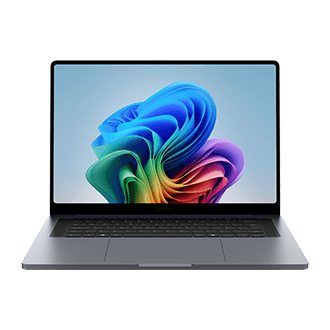
The Microsoft Surface Laptop 13.8-inch (8th Edition) is the mainstream ultraportable in Microsoft's 2026 Surface line-up, and it steps in as the mid-range successor to the previous year's Surface Laptop 13. The pattern of recent Surface machines is a familiar one: near-faultless construction wrapped around a machine whose performance never quite keeps pace with expectations. What has changed this time is the silicon, because this edition runs on Qualcomm's latest Snapdragon X2 generation. The configuration reviewed combined 16 GB of memory with 512 GB of storage.
Design and build
In its Jade finish the Surface Laptop 13.8-inch is hard to look at without thinking of the MacBook Neo. The green is easy on the eye and sits nicely against the slightly different shades used for the keyboard and trackpad area once the lid is open. The screen diagonal is a little larger than the usual 13-inch standard, yet the footprint has not grown much and remains fairly contained.
Closed, though, its extra bulk is noticeable, particularly against its most direct rival. The MacBook Air holds a 11.3 mm profile where the Surface Laptop 13.8-inch measures 17.5 mm, and Microsoft's machine is also around 100 g heavier at 1330 g on the scales.
Dense it may be, but the payoff is rigidity. The structure resists the flex that afflicts lighter shells when the keyboard is attacked with a little too much enthusiasm. That leads neatly to the input modules, which as usual on a Surface are excellent. The keyboard is genuinely pleasant to type on, with a muted sound and a short, crisp return, although the left Shift key is a touch small. The trackpad glides without catching and its haptic feedback is well judged, but it could have used the few spare millimetres available to grow vertically, as most ultraportables now do.
Ports and wireless
Connectivity settles for the minimum expected of an ultraportable: one USB-A 3.2 port, two USB-C 4 ports, a headphone output and a Surface Connect socket for the brand's proprietary charging cable, which is sold separately. Nothing remarkable, in other words. Wireless fares better thanks to the Qualcomm FastConnect 7800 network controller, which brings Wi-Fi 7 and Bluetooth 5.4.
Cooling and noise
The active cooling system keeps noise reasonable even under a heavy load, with 38 dB registered on the sound level meter during the recorded test — around the average for comparable ultraportables. The chassis does warm up, with the expected hot spot near the exhaust vent and an average close to 40 degrees on the warmest part of the keyboard. The underside stays surprisingly mild.
Performance
The processor here is the Qualcomm Snapdragon X2 Elite (X2E-80-100), a 12-core Oryon design running to a maximum of 4 GHz. It sits in the middle of Qualcomm's latest generation, and this is the first machine with that chip covered here.
Unsurprisingly, the Snapdragon X2 Elite runs neck and neck with the Intel Core Ultra X7 358H, arguably its closest rival, and takes a clear lead over the previous-generation Snapdragon X. There is still ground to make up on Apple's silicon, however, because the M5 pulls away without much apparent effort in the CPU performance indices.
Those theoretical results follow through into the applied benchmarks, with one snag. Even after several passes, the 4K video export test in Premiere Pro run on the CPU alone returned a score well below expectations. The GPU benchmarks do point to some versatility for occasional content creation, although it remains limited, and the gaming run was disappointing: Shadow of the Tomb Raider at the Very High preset and Full HD resolution averaged 27 fps. The Adreno X2-85 graphics unit, clocked at 1.7 GHz, runs out of breath quickly. Storage is on firmer ground, the SSD returning sequential throughput of 6428 MB/s reading and 5563 MB/s writing.
Display

Microsoft has taken the conservative route with a conventional LCD panel for its 2026 Surface range, at a point when more and more rivals are moving to OLED even on entry-level models. The consequence is no infinite contrast — the measured average ratio here is 1285:1 — and no near-zero persistence, since response was calculated at 14 ms. There is no notable anti-reflective treatment either, the panel reflecting 32 % of ambient light, a figure that is far from disastrous but still disappointing.
The genuinely unconventional choice is the display resolution of 2304 x 1536 px, which is not found elsewhere and hints more at Apple's habits than Microsoft's own hardware conventions. Calibration blows hot and cold, mostly hot: the average colour temperature came in at 5403 K, a long way from the 6500 K ideal. The colour delta E of 2.6 is more reassuring, sitting below the threshold of 3 at which colour drift becomes visible to the naked eye.
Sound
For a compact 13-inch laptop the speakers do relatively well, holding together at high volume even if, predictably, bass is absent. The headphone output is merely average, whether on distortion, dynamic range or crosstalk. Only its output level stands out, sitting slightly above the rest of the comparison group.
Battery life
It would be reasonable to assume that the extra thickness of the Surface Laptop 13.8-inch hides a competition-grade battery, but that is not the case: the indicative capacity is a modest 52 Wh. The battery benchmark, which simulates mixed use across office work, content consumption and a heavier task, bears this out. The machine lasted 6 h 32 min before reaching the 5 % threshold and dropping into standby. That places it behind Apple's MacBook Air M5, and also behind Dell's XPS 14 with Intel's Panther Lake chip.
Repairability
There is little to see inside. Microsoft has tidied everything away under insulating tape, and the machine is thoroughly limited in what can be changed: only the battery is replaceable. Disassembly at least is straightforward, the rear cover lifting away without difficulty once the four rubber feet and the screws underneath have been removed.
How it compares
It is hard not to prefer Apple's MacBook Air M5, which is both more powerful and just as well built, and adds a better calibrated panel. Only its port selection falls short of the Microsoft machine. For anyone allergic to macOS, the Samsung Galaxy Book6 Pro 14 is the more complete package.
Ready to Purchase?
Check current prices and availability
Affiliate Disclosure: As an Amazon Associate I earn from qualifying purchases. Truthful Reviews may receive a commission when you buy through eligible Amazon UK or Amazon US links, at no extra cost to you. Affiliate partnerships never determine our verdicts or recommendations.